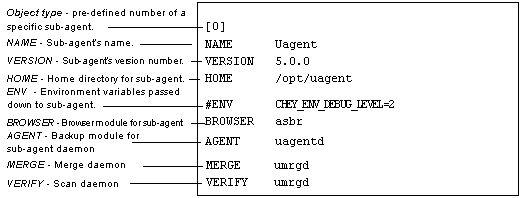
The global configuration file, agent.cfg, keeps track of each sub-agent (Backup and/or Client Agent) installed on your system. This file is located in the /usr/CYEagent directory, and receives the sub-agent information when the uagentsetup script is run.
| The Client Agent for UNIX must be configured prior to use. See the ARCserveIT Release and Install Notes for detailed information. |
Each grouping of fields directly corresponds to an installed sub-agent. All fields are pre-determined with the exception of the sub-agent home directory, which is set for you when configuring the agent. If required, the environment variable field will be determined during installation/configuration of a sub-agent.
Variables may be entered into the file manually, such as an additional environment field associated with a particular database. Any modifications to the agent.cfg file will not take effect until the sub-agent is stopped, then re-started.
An example of the agent.cfg file is shown below, accompanied by a description of each sub-agent field: