SMS backup and restore operations
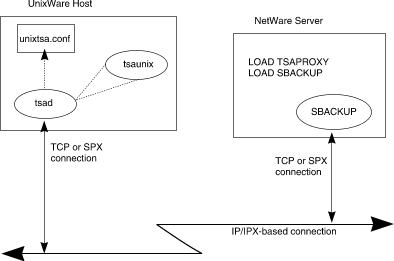
The following diagram shows how a typical backup session is set up and
established:
A typical backup session
-
To be able to backup and restore files on a UnixWare system, a NetWare
server's name must appear in the
unixtsa.conf(4)
file on the UnixWare system. The protocol that the NetWare server will
use to attempt to connect to the UnixWare system must also be listed next
to the NetWare server's name.
-
Then, the
tsad(1)
daemon must be started on UnixWare. See
``Configuring UnixWare for backup/restore from NetWare''.
This daemon listens over the network for connection requests from backup
engines running on the NetWare servers listed in unixtsa.conf.
-
After making sure the NetWare server has the appropriate protocols
available, load at least the TSAPROXY NLM and then
load the backup engine (such as SBACKUP). See
``Configuring NetWare for UnixWare backup/restore''.
-
Once the backup engine is loaded, the backup or restore operation is
under the control of the backup engine. Through it, you send a request
to the UnixWare system.
-
The tsad daemon receives it, and launches a
tsaunix(1)
process.
-
The backup engine and the tsaunix process now cooperate to
perform the operation you request. Data is backed up onto the media you
select throguh the backup engine on NetWare. The SBACKUP
software included with UnixWare can access any NetWare device known
to the server on which it is running.
See
``Backing up a UnixWare system from NetWare''
for a sample SBACKUP session.
The restore process works much the same way, with that backup engine and
a tsaunix process cooperating to restore data from the backup
media. See
``Restoring backup onto UnixWare''.
© 1999 The Santa Cruz Operation, Inc. All rights reserved.
UnixWare 7 Release 7.1.1 - 5 November 1999