How XCONSOLE works
The following diagram shows how a typical XCONSOLE session works.
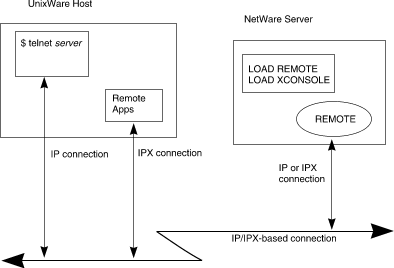
A typical XCONSOLE session
-
On the NetWare side, the REMOTE and XCONSOLE
NLMs are loaded on the NetWare server.
The REMOTE NLM asks for a password when it is loaded;
this is the password that will be used to log in to the NetWare console from
UnixWare.
-
On the UnixWare side, an XCONSOLE session is initiated via the
telnet(1tcp)
command.
TCP/IP must be set up and configured on UnixWare for telnet
to work.
-
The system asks for a password. This is the password you specified in
Step 1.
-
Once you login successfully to the server, the remote console session is
established and you can perform tasks just as if you were sitting in front
of the NetWare console.
See
``Setting up UnixWare for XCONSOLE''
for UnixWare setup instructions. NetWare setup instructions can be found in
``Setting up NetWare for XCONSOLE''.
See
``Logging in to the NetWare console from UnixWare''
for a detailed description of using telnet to launch a remote
NetWare console.
© 1999 The Santa Cruz Operation, Inc. All rights reserved.
UnixWare 7 Release 7.1.1 - 5 November 1999