If a host is on a local subnet that has more than one router, you may want to specify which routers should route traffic to which networks.
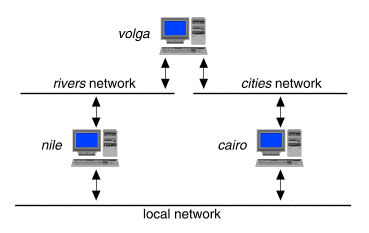
For example, consider the system shown in ``Choosing specific routers''.
Choosing specific routers
In this example, your local system has two routers, nile and cairo, available to it on the local network. Your system needs to communicate regularly with networks named rivers and cities. The router nile is directly connected to the rivers network and cairo is directly connected to the cities network. As the rivers and cities networks are also connected via the router volga, you would prefer that packets take the shortest route to the rivers or cities networks via nile or cairo as appropriate. To specify that traffic from your system should follow the shortest route, you would add the route following entries to /etc/inet/config:
   sort-key:/usr/sbin/route::y:add -hopcount 1 rivers nile:
   sort-key:/usr/sbin/route::y:add -hopcount 1 cities cairo:
These entries set up your system so that it sends messages intended for different networks through different routers, rather than sending all traffic through the same router. It is not necessary to define backup routes in case nile (or cairo) becomes unavailable because the remaining router will advertise the alternative route via volga to rivers (or to cities).
If all of your routes are defined in /etc/inet/config, you can disable the routed daemon entry in the /etc/inet/config file to improve system performance. To provide backup routes in the case that either nile or cairo becomes unavailable, you could additionally define these routes in /etc/inet/config:
   sort-key:/usr/sbin/route::y:add -hopcount 2 rivers cairo:
   sort-key:/usr/sbin/route::y:add -hopcount 2 cities nile:
If the rivers network also contained one or more connections to other networks, such as the Internet, you could also add an entry for a default route:
sort-key:/usr/sbin/route::y:add default nile:This would handle traffic to all other networks. For more information, see route(1Mtcp).
If the network topology is multiply connected, as in the above example, we recommend that you run a routing daemon, such as routed, on your network clients as described in ``Running a routing daemon on a non-routing host''.