How the SCO DHCP server works
``Steps in serving configuration parameters to a DHCP client''
shows the steps that the SCO DHCP server normally
undertakes to service a DHCP client with its configuration
parameters.
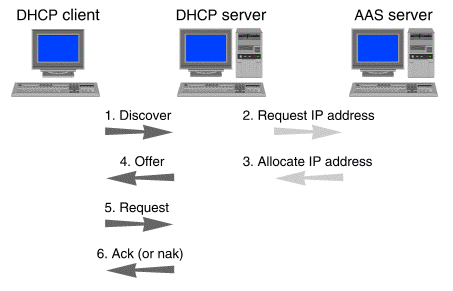
Steps in serving configuration parameters to a DHCP client
The numbered steps in the figure show the sequence of events:
-
When the SCO DHCP server receives a
``discover'' message from a client requesting
configuration parameters, it constructs the set of
parameters corresponding to the client from the
DHCP configuration file. This set of
parameters can be built from any combination of
global options, subnet-specific options,
class-specific options, and client-specific options.
See
``DHCP options''.
-
If there is no entry for the client in the
configuration file, or if the client's entry does
not contain an IP address, the
DHCP server leases an IP address
to the client from the Address Allocation Server (AAS).
If the client's entry in the configuration file
already contains an IP address, the DHCP
server assigns that address to the client. See
``Manually assigning IP addresses''.
-
If requested, the AAS server allocates a dynamically
assigned IP address for the DHCP server to assign (see
``Dynamically assigning IP addresses'').
The AAS server takes the address
from a pool of addresses that are consistent
with the client's subnet.
-
The DHCP server constructs an
``offer'' message containing the client's
configuration parameters (including an IP address)
and sends it to the client.
-
The server waits
for a ``request'' from the client accepting the
parameters and address.
-
After the client accepts the
offered parameters, the server sends an ``ack''
(acknowledgment) message completing the process.
Steps 5 and 6 are repeated whenever a DHCP client
needs to renew the lease on its IP address.
If the server sends a ``nak'' (negative acknowledgment) message
instead of an ``ack'' message in step 6,
the client must start again from step 1.
This may happen if the requested IP address
is no longer available.
For more information on DHCP message types
and message exchange, see RFC 2131.
More than one SCO DHCP server can be
configured on a network, if necessary, but these
servers cannot share the same pool(s) of addresses.
The DHCP server can configure clients on
different subnets by using BOOTP gateways.
See
``Setting up a BOOTP gateway''
for more information.
© 1999 The Santa Cruz Operation, Inc. All rights reserved.
UnixWare 7 Release 7.1.1 - 5 November 1999