The DHCP server can configure a client
with any of the options specified in RFC 2132.
DHCP uses the same request and reply packet
format as BOOTP so configuration options are
carried in the portion of the BOOTP packet
reserved for vendor extensions. DHCP terms this
the ``options'' field and expands it from 64 bytes to 312 bytes.
Multiple sets of DHCP options can be
specified in the DHCP configuration database.
The following table shows the possible types of option sets and
their precedence:
Option set type
Precedence
Description
Client
Highest
Generally used to specify a static IP
address for an individual client. The DHCP
server automatically assigns this address to the
client rather than using one obtained from the address pool
assigned to the subnet.
You can also create a client entry without
a static address, if you need to specify unique option values
for the client but still want its IP address to be assigned
dynamically.
A DHCP client identifies itself to the server
using its network hardware (MAC)
address, or using an identifier if it is an opaque client.
As many sets of client options can be created as are needed.
User class
Offered to any
client that specifies the user class identifier in
the ``discover'' message.
As many sets of user class options can be created as are needed.
Subnet
Includes the name of the address pool from which the DHCP
server draws IP addresses to allocate to clients,
the default and maximum leases
for these addresses, and lease renewal and
rebind times, along with a set of DHCP
options specific to the subnet.
As many sets of subnet options can be created as are needed.
Global
Lowest
Applies to all DHCP clients.
Only one set of global options can be created.
The set of global DHCP options, for
example, applies to all clients, whereas a set of
subnet options applies only to the clients on a
specified subnet.
If you configure the same option in more than one set of
options, the precedence of the option type
decides which the DHCP server offers to the client.
For example, if the ``LPR Servers'' option is specified
in both the subnet set of options and the
global set of options, the DHCP server
configures the client with the LPR Servers
information defined for the subnet.
An additional class of options is vendor class options. These
are intended to provide information that is specific to a
particular vendor's hardware.
These options are offered to any
client that specifies the vendor class identifier in
the ``discover'' message.
As many sets of vendor class options can be created as are needed
for different types of client hardware.
It is also possible to redefine a standard option (with codes
in the range 1 through 254)
for use by a vendor class. Such a redefined option is
called a ``vendor-specific option'', and is only visible to
the vendor class for which it is defined.
Vendor class options are delivered ``encapsulated'' to the
client and so are not affected by precedence rules that the server
applies to other options.
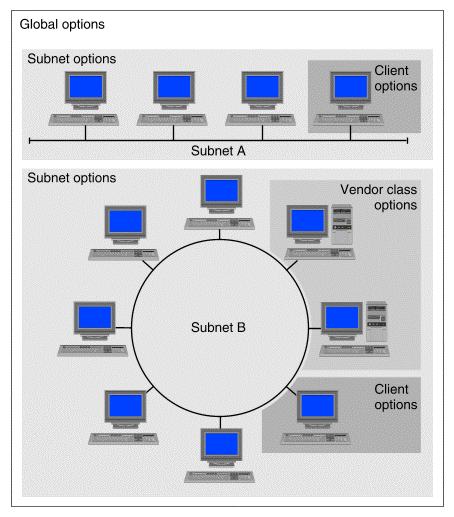
Mapping sets of DHCP options to a network
``Mapping sets of DHCP options to a network''
shows an example of how the option sets defined on the
DHCP server can be considered as creating a map of
the configuration parameters needed by DHCP clients:
In the figure, the set of global options is applicable to all the
clients whether they are in subnet A or subnet B.
This set could include information such as the domain name, and the
IP addresses of DNS servers.
Each of subnets A and B requires its own specific
set of subnet options. Each set of subnet options
defines information specific to the subnet such as the name of the
pool of IP addresses that are available for clients to use,
a subdomain name, and the IP addresses of routers.
In subnet B, two machines are shown as belonging to a
group which shares a vendor class set of options. For example, their
architecture might require them to look in a different TFTP
boot directory for configuration files or a bootstrap program than other
machines on the same subnet. Another possibility is that they use vendor
class options to obtain boot configuration parameters that are specific
to their hardware.
You could similarly group machines to use different pools of
dynamically allocated IP addresses by specifying appropriate
sets of user class options. You must take care not to configure pools
which define overlapping ranges of available IP addresses.
Finally, in both subnet A and subnet B, a client is shown
as having its own set of client options defined for it. This could be
used to define a static IP address for the client. Clients which
are themselves servers for other networking services and need to be always
available at the same IP address should be configured in this way.
Option overload
Although the DHCP client can specify a
larger response packet size, the practical limit for
DHCP options is 274 bytes. (An additional
192 bytes can be provided if the option overload
feature is enabled. Option overload is a server
parameter.) Each option consists of a 2-byte header
and the option data, such as an integer or an array
of IP addresses. A single option cannot
exceed 255 bytes of data.
If the server finds that the configured options
exceed the allowable limit, it uses as many options
as possible starting from the top of the configured
options list and sends an error message to /var/adm/log/syslog.
Clients can send a configured options list in the
``discover'' message. In the situation mentioned
above, this ``Parameters Request List'' takes precedence
over any other configured options.
Default option values
Some DHCP options have default values. If you configure
an option that has a default value and do not configure a value
for the option, the DHCP server sends the default value.
The following table lists DHCP options that have default values.