The SCO implementation of DNS supports the following server configuration types:
A master server is authoritative for one or more DNS zones. Each server maintains its data in database files, and may transfer this data periodically to a slave server if one exists in the zone.
When a server answers a client request, it attaches an expiration (specified by the time-to-live variable) for the data after which the data is considered invalid. The time-to-live variable is specified in the SOA (Start of Authority) resource record contained in the zone's database file.
Master name servers should be machines that are reliable and have excess memory and disk storage space.
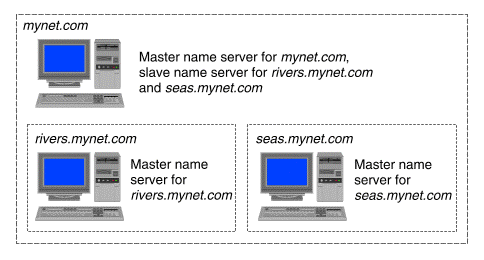
A server may serve as a master server for one or more zones and as a slave server for other zones. ``An example of a master name server'' shows an example of a name server that is master for mynet.com but slave for its children rivers.mynet.com and seas.mynet.com.
An example of a master name server
The master server reads the configuration file, /etc/named.conf, to determine which zones are served and in which zone files the data is stored.
See ``Configuring a host as a name server'' for instructions on how to configure a master name server using the DNS Manager.
A slave server functions as a backup to the master server, should the master be unreachable or down. It maintains a copy of the zone file (the host database for the zone) and, at a specified interval defined by the refresh variable, retrieves the contents of the master's file. If it cannot reach the master for a refresh, it tries again at intervals defined by the retry variable and, if it cannot reach the master within the time specified by the expire variable, the data is flushed. ``An example of a slave name server'' shows an example of a master name server supported by a single slave name server.
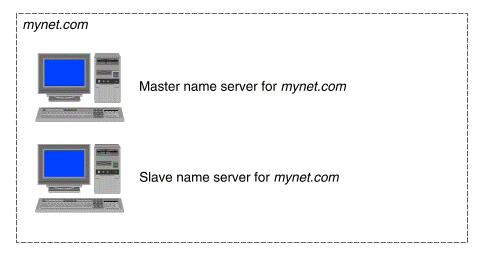
An example of a slave name server
When a slave server answers a client request, it attaches an expiration for the data (specified by the time-to-live variable) after which the data is considered invalid. The time-to-live value is specified in the SOA (Start of Authority) resource record contained in the zone's database file.
A server may serve as a slave for one or more zones and a master for others.
See ``Configuring a host as a name server'' for instructions on how to configure a slave name server using the DNS Manager.
If a master server delegates a portion of the domain name space, such as a child zone (subzone), it needs to maintain information about the servers in that child zone. For example, the master server in the domain mynet.com needs to be aware of the name servers in rivers.mynet.com and seas.mynet.com. It can do so in two ways: by either serving rivers.mynet.com and seas.mynet.com as a slave name server, or by serving them as a stub server as shown in ``An example of a stub name server''.
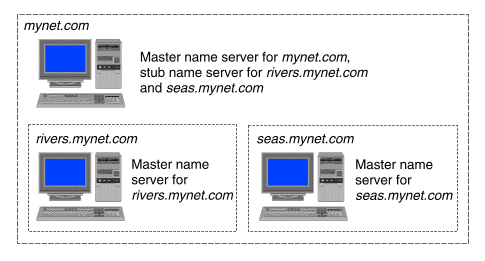
An example of a stub name server
A stub server only maintains records needed to locate name servers of a delegated child zone. It does not maintain a full database of address (and other) records for the subzone. This allows the administrators of the child zone to move or alter their name servers without altering the parent zone's configuration files, provided the address listed in the stub line is still valid. Configuring the master server for a zone as stub server for its child zones prevents it incurring the overhead of having to perform regular zone transfers with them.
See ``Configuring a host as a name server'' for instructions on how to configure a stub name server using the DNS Manager.
A caching-only server saves data in a cache file until the data expires. Expiration occurs based on a ``time-to-live'' field attached to data received from another server. The server answers data from its cache if it has the information, or requests it from authoritative servers if it does not.
Caching-only servers may make use of forwarders, servers with connections to outside networks that build up a large database of data. In this case, the caching-only server first queries a forwarder (rather than following its default resolution process), which in turn queries other servers, if necessary, to find the desired data. This limits traffic outside the zone to traffic to and from the forwarders. If the forwarder does not answer, the caching-only server tries the master server for its zone.
If not configured to only use forwarders, a caching-only server may ask name servers outside its zone (including root domain servers) to help answer queries.
If a caching-only server is configured only to use its forwarders, it will not query any other servers. The resolver running on the same machine may be configured to query other servers but any replies will not be added to the local cache.
See ``Configuring a host as a name server'' for instructions on how to configure a caching-only name server using the DNS Manager.