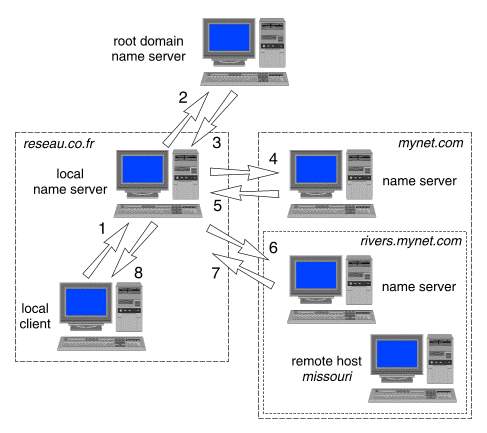
Resolution occurs when a client queries a name server to obtain the IP address with which it wants to connect. If a name server in the local domain cannot resolve a client's request, it queries other servers to locate a server that can.
There are two types of resolution:
By default, a name server queries ``iteratively'' (or non-recursively). This means that it queries several name servers in turn until it finds an answer. It starts by consulting a known name server within the domain hierarchy that contains the destination machine. If it does not already know of a suitable server to ask, it first asks a server in the root domain. Each server responds by referring to a name server in the domain name hierarchy that is closer to the one containing the destination machine. The local server then repeats its query to the name server whose name and IP address it has just been given. In this way, the local server traverses the domain name space until it reaches a name server for the domain that contains the destination machine. This name server should be able to provide the IP address of the destination machine. ``Obtaining an IP address by iterative query'' illustrates how a client in the domain reseau.co.fr might obtain the IP address of the remote host missouri.rivers.mynet.com.
Obtaining an IP address by iterative query
The steps taken to resolve missouri.rivers.mynet.com to its IP address are:
In a recursive query, a name server behaves like a client and asks another name server to either provide it with the answer to its query, or to return an error because it cannot supply an answer. Unlike an iterative query, the name server that is queried will not reply with a referral to a different name server.
A name server that specifies one or more ``forwarders'' will forward recursive queries to these before trying to find the answer itself by iterative query to other name servers including those in the root domain. You would normally specify forwarders if you want to reduce the cost of access to an off-site network such as the Internet. The forwarder machines would build up a significant cache of information that, over time, would reduce the need to access an external name server.
Forwarders can also be used by name server hosts that are not permitted to have direct access to off-site networks or the Internet. Such hosts are usually on local networks that are isolated from the outside world by a ``firewall'' router. A firewall prevents potentially dangerous packets from having access to an organization's networks. In such a situation, the firewall should be configured to allow only the name servers that are named as forwarders to query external name servers.
If a name server is also configured in ``forward-only'' or ``slave'' mode, it is only allowed to use its forwarders to resolve queries.
If you intend to connect to a domain server outside of your local network, you must register with the appropriate organization to avoid giving it a name that already exists (``name space collision''). For information on registering a new domain name, see ``Obtaining a domain name and an IP network number''
If the domain you are creating is a subdomain of an existing domain, contact the responsible person listed in the SOA (Start of Authority) record for the existing domain. You can use nslookup to obtain SOA records.
Once you have established the name of the domain(s) that you will administer, configure a master name server for each zone within the domain(s). Additionally, you should configure slave name servers for each zone to provide name service in the event that the master name server fails. Note that a machine can be a master name server for more than one zone but there can be only one master name server for each zone.