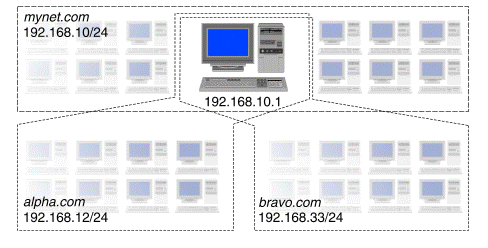
A ``virtual domain'' is a domain that partially or wholly encompasses one or more systems within another domain, but which appears to be a separately existing domain as seen by other domains. In this way, e-mail, FTP and Web services for different virtual domains (corresponding to separate departments, organizations, or companies) can be hosted and administered on the same system. To users in one of these domains, it appears that these services available within their domain are provided independently of those in the other domains.
``A host server for several domains'' shows an example where a host with IP address 192.168.10.1 on the network 192.168.10/24 (that is, a network address of 192.168.10.0 with subnet mask 255.255.255.0) is required to provide e-mail, FTP and Web services for two domains: alpha.com and bravo.com.
A host server for several domains
The host's IP address is already listed in the zone files for the mynet.com domain. It would be an error for it also to be listed in the zone files for alpha.com and bravo.com because these have different network addresses (192.168.12/24 and 192.168.33/24).
A host which is present in multiple domains needs to have unique IP addresses in each domain. To achieve this, use the ifconfig(1Mtcp) command to create ``alias'' addresses for one or more existing network interfaces as described in step 1 of the procedure listed in ``Enabling virtual domains''.
``Aliasing IP addresses to create virtual domains'' shows how alias addresses are used to set up the virtual domains on the host.
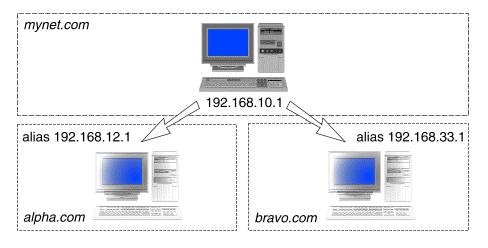
Aliasing IP addresses to create virtual domains
In the alpha.com domain, the host system's address has been aliased to 192.168.12.1 on network 192.168.12/24. In the bravo.com domain, the alias address has been set to 192.168.33.1 on network 192.168.33/24.
On the DNS zone files on the master server, the host system could be assigned the same name (using A and PTR records) in each domain, for example: www.mynet.com, www.alpha.com, and www.bravo.com. Alternatively, it could be assigned different names, such as mach1.mynet.com, mbase.alpha.com, and mclan.bravo.com. Using CNAME records, the host could also be assigned alias names by which it is also known in each domain.
In UnixWare® 7, the following networking applications can make use of virtual domains:
