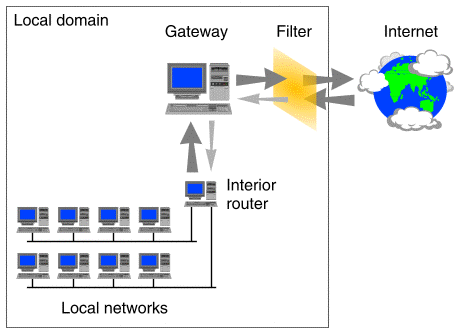
If you want to protect portions of an organization's networks or intranet from unauthorized snooping or other forms of attack, or simply for the sake of privacy, you can also configure packet filters on the network interfaces of routers between networks, or on the network interfaces of individual hosts.
A packet filter can be configured on any LAN network interface that uses an MDI network adapter driver, and also on any WAN network interface that uses the version of the PPP serial line protocol provided by UnixWare. ``A packet filter applied to a gateway'' shows a packet filter that has been applied to the interface on a gateway machine that connects local networks to the Internet.
A packet filter applied to a gateway
Connections to the Internet are usually made using a PPP link to an Internet Service Provider (ISP). By placing the filter on the gateway interface, the network administrator can effectively control all network traffic between the local site and the external world. You can also apply a packet filter to the interface between the gateway machine and the local network to set up a ``tiered'' filtering system. By suitably configuring the filters on the external and internal interfaces of the gateway machine, you could allow access from outside to certain services such as FTP and HTTP on the gateway machine but prevent such access to your internal systems. To allow access from hosts on your internal networks to the gateway machine, you need only restrict access to the services for packets that originate from external addresses.
On LAN network interfaces, such as Ethernet and Token Ring LAN adapters, you can configure a filter that screens all packets, or you can configure separate filters for incoming or outgoing packets.
Each interface has its own filter definition file which can contain several different filter definitions (see filter(4)). Only one packet filter can be loaded on the incoming stream or the outgoing stream of an interface at any time. The incoming and outgoing streams can use the same packet filters, or they can use different ones. If a packet filter is unloaded from a stream, the interface will pass all packets on that stream. ``How packet filters are applied to a LAN network interface'' shows how separate filters might be applied to the incoming and outgoing streams of one of a router's network interfaces.
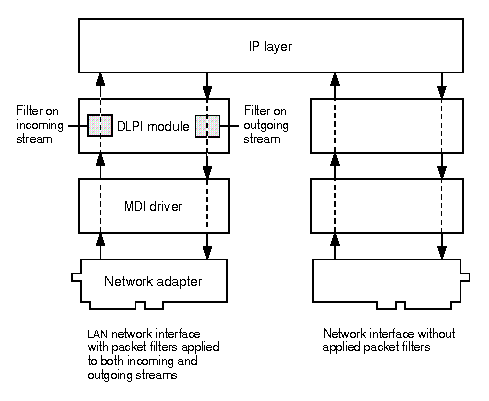
How packet filters are applied to a LAN network interface
An SCO PPP interface can be configured with four types of packet filter as part of its Internet Protocol Control Protocol (IPCP) characteristics (see ppptalk(1M)):
There are two basic methods for constructing a packet filter:
Rather than blocking access to certain services for all external addresses, you may choose to restrict access to a specified subset of IP addresses. This is necessary, for example, if you want to restrict access to your internal DNS name servers but you need to be able to answer queries from root domain name servers.