Other sections of this topic discuss the routing of unicast packets which have a single destination address. Multicast datagrams, however, are intended to arrive at several addresses but not all addresses (unlike broadcasting). This feature is used by networking application programs that want to allow the participation of several (or many) interactive users on different systems. It avoids the difficulty and overheads of having to set up multiple unicast connections between each possible pair of machines that might wish to communicate. Broadcasting is also not a suitable solution as it will only work within subnets and not all machines may wish to participate.
Multicasting uses class D IP addresses in the range 224.0.0.0 to 239.255.255.255 with the lowest 28 bits of the address forming the ID of the multicast group. If a machine wishes to join a multicast group on a particular Ethernet or FDDI interface, its network adapter must be programmed to receive frames destined for a special 48-bit MAC address. This MAC address is based on the IP address of the multicast group but it is not unique to it. If the interface is via a Token-Ring network adapter, a single MAC address is available for use. In all cases, the network adapter driver has to perform filtering so that only datagrams for the correct multicast group(s) are passed up the networking protocol stack toward the application.
The Internet Multicast Backbone (MBone) is a network of routers on the Internet that can forward multicast datagrams. It allows the provision of group communication for applications such as audio and video conferencing where more than two hosts wish to participate at a time. It also allows broadcasting across the Internet to only those networks which wish to participate. There are also many other uses of multicasting that are not discussed here.
If you want to participate in a multicast session either within your intranet or on the Internet MBone, you will need to know its multicast address and which UDP ports it will use. Conferencing software and other application programs that use multicasting often have facilities for announcing forthcoming multicast sessions, and for receiving such advertisements.
The MBone relies on a network of routers that support the forwarding of IP multicast datagrams. It is possible to connect to the MBone if intermediate routers between your site and the MBone do not support multicasting using a technique known as ``tunneling''. Multicast routers at each end of the tunnel encapsulate multicast datagrams within unicast IP datagrams so that the information can pass unhindered to the other end of the tunnel. Once an encapsulated datagram arrives at the other end of a tunnel, it can be unwrapped and transmitted as a multicast datagram.
The need for tunneling is becoming rarer as the MBone grows and more hardware routers become capable of forwarding multicast datagrams. Contact your Internet service provider or the administator of your local autonomous domain if you wish to use MBone facilities.
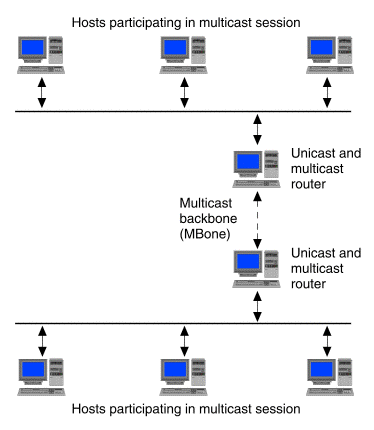
The mrouted(1Mtcp) daemon can implement multicast routing directly to other multicast routers such as those on an Intranet or the MBone as shown in ``Multicast routing directly on the MBone''.
Multicast routing directly on the MBone
If no external multicast routers are available, you can use mrouted to set up a tunnel to a multicast router on a distant subnet. The tunnel is defined using a tunnel statement in the file /etc/inet/mrouted.conf. This example entry defines a tunnel from the IP address of the local multicast router, 200.20.34.12, to the IP address of the remote multicast router, 190.146.25.24:
tunnel 200.20.34.12 190.146.25.24 metric 1 threshold 32The next example extends the previous example by defining a boundary so that mrouted will not forward multicast datagrams which originate from the local 200.20.35.0 network:
   name PRIVATE 200.20.35.0/24
   tunnel 200.20.34.12 190.146.25.24 metric 1 threshold 32 boundary PRIVATE
The remote machine at the other end of the tunnel must have a corresponding definition in its mrouted.conf file that defines a tunnel in the opposite direction:
tunnel 190.146.25.24 200.20.34.12 metric 1 threshold 32For more examples, see the mrouted(1Mtcp) manual page.
Once a tunnel is established, encapsulated multicast datagrams may travel via unicast routers that do not support multicast routing as shown in ``Multicast routing via a tunnel''.
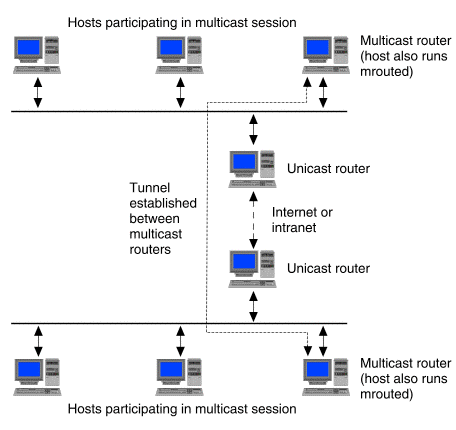
Multicast routing via a tunnel