Troubleshooting PPP links
The configuration of a PPP link
and the transfer of application data over it require several steps,
almost all of which are transparent to the user.
Failure to achieve a successful PPP connection can occur
during any of these steps.
This section describes troubleshooting procedures and debugging information
that can make these steps visible to help identify the reason for failure.
The steps can be divided into two stages:
-
Host-to-host connection requiring the calling (outgoing)
host and the called (incoming) host to have established
a physical connection and to be able to exchange data.
-
PPP negotiation requiring
the two hosts to agree PPP characteristics for
the connection before they can exchange application data.
The phases of PPP negotiation are defined by the
PPP protocol. Because of this, troubleshooting
PPP negotiation
is very similar for all PPP links.
Once a PPP link has been established, it may be brought down
due to the connection being broken at either end or at any intermediate
point. If a link remains established but you experience difficultly in
communicating with remote systems, it is possible that network
packets are not being routed correctly over the PPP link.
``Steps in troubleshooting PPP links''
illustrates the suggested procedure for eliminating problems when
you are trying to establish a PPP connection or when
you want to understand why you are having problems with an
established connection.
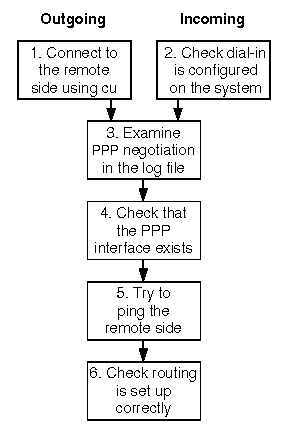
Steps in troubleshooting PPP links
The steps are detailed in the following sections:
-
``Connect to the remote side using cu''
(outgoing connections only)
-
``Check that the system is configured for dial-in connections''
(incoming connections only)
-
``Examine PPP negotiation in the log file''
-
``Check that the PPP interface exists''
-
``Try to ping the remote side''
-
``Check that routing is set up correctly''
NOTE:
The advice in step 1 is for outgoing connections over
modems and dedicated serial lines only.
For information about troubleshooting ISDN
connections, see
``Troubleshooting ISDN connections''.
For advice on how you should configure PPP on
Microsoft Windows systems so that they can interoperate with
a UnixWare® 7 remote access server, see
``Interoperating with PPP in Microsoft Windows''.
For advice on interoperating with 3Com NetBuilder, see
``Interoperating with 3Com NetBuilder''.
© 1999 The Santa Cruz Operation, Inc. All rights reserved.
UnixWare 7 Release 7.1.1 - 5 November 1999