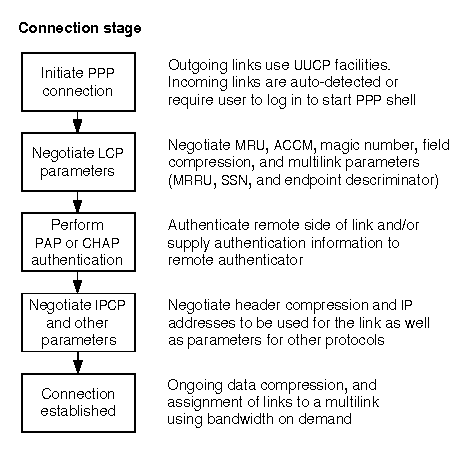
If you still cannot establish an incoming or outgoing PPP connection, you must use the debugging facilities of ppptalk(1M) to diagnose where the problem lies. ``Stages in negotiating a PPP connection'' shows that once a physical connection has been established between the systems at each end of the link, PPP negotiation can be divided into a number of stages. If the negotiation fails in any of these stages, the link may be dropped and the connection terminated. By turning on debug logging, you can watch these stages and see where any problems are arising.
Stages in negotiating a PPP connection
Debug information is written to the file /var/adm/log/ppp.log.
To change the level of detail for a particular bundle or physical link, you
can use the debug facility that is available with the
ppptalk command.
For example, to set a medium debug level on the bundle test,
and a high debug level on the link link_0, you would enter the
following commands:
ppptalk debug med bundle test
ppptalk debug high link link_0
The low debug level generates a small amount of output including negotiated
values. The medium level generates more detailed output and is usually
sufficient for most debugging purposes. The high debug level
is usually only necessary if you want to see all packets and their
contents. This can rapidly generate a large quantity of data in the log
file. For more information about the debug levels, see
ppptalk(1M).
If you do not know the names of the links which
a bundle references, use the following
command to list the links statement
within a bundle definition:
ppptalk list bundle name | grep "links"
Look for a line in the output such as:
links = link_0 link_1 link_2 link_3The example of debug output in the following sections is for a manually connected outgoing PPP link over a modem. The debug level was set to medium for both the bundle (Annex) and the link (link_0). The time and date information at the start of each line has been replaced with a line number for clarity.