Ideally, all objects a user wants to access under bindery services should be located in the same bindery context. However, this is not always possible or practical.
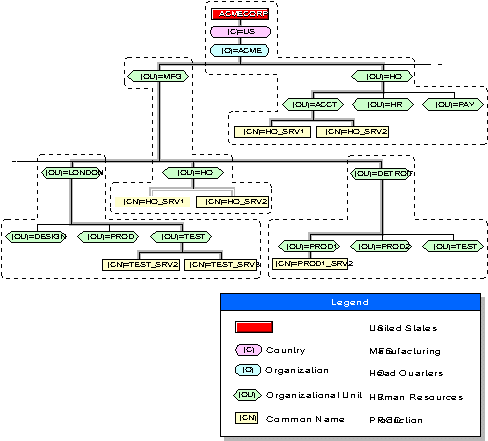
You can set multiple bindery contexts for users who need to access objects outside of their own bindery contexts. For example, consider the Directory tree in the following figure:
Multiple Bindery Contexts in the Same Directory Tree
To set bindery contexts on the servers HQ_SRV1 and HQ_SRV2 in this figure, you could use nwcm utility to type the following:
   nwcm -s ds_bindery_context='ACCT.HQ.ACME;PROD1. DETROIT.MFG.ACME; \
    TEST.DETROIT.MFG.ACME;
To set multiple bindery contexts, you must set the contexts to include the
path all the way to the [Root] of the tree. You can set up to 16 contexts
per server.
Do not change a server's bindery context once you set it. Changing a server's bindery context prevents all bindery services users (from the original context) who need to log in to that server from accessing bindery services. Changing the server's bindery context can also disable access to print queues.