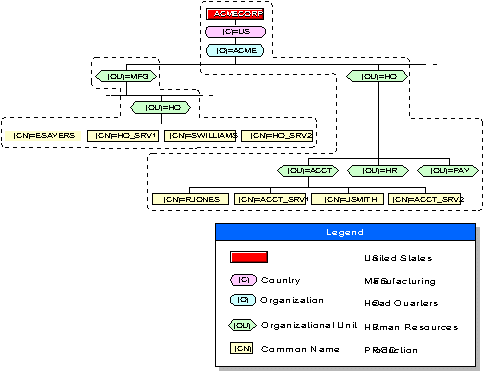
If the Directory tree contains more than one level, the bindery context has a more noticeable effect on a user's ability to access bindery services. For example, consider the Directory tree shown in the following figure:
Two Different Bindery Contexts in a Directory Tree
This Directory tree has seven container objects, each designated by the name type O (Organization) or OU (Organizational Unit).
Note that the following examples use the nwcm(1Mipx) command line utility to set bindery contexts. You can also use the scoadmin(1M) NetWare Setup utility (see ``NetWare Setup'').
Suppose the ACME Corporation requires bindery services and sets bindery contexts as follows:
nwcm -s ds_bindery_context="ACCT.HQ.ACME"
nwcm -s ds_bindery_context="HQ.MFG.ACME"
Now suppose that users in the ACCT.HQ.ACME container no longer need bindery services, but that ESAYERS now requires bindery access to ACCT_SRV1. The bindery context for ACCT_SRV1 can now be set with the following command:
nwcm -s ds_bindery_context="HQ.MFG.ACME"This requires that a writable replica of the MFG partition be stored on the ACCT_SRV1 server. Also, rather than change the bindery context for the ACCT_SRV1 server, you might choose to place an Alias object for the ESAYERS User object into the ACCT.HQ.ACME container.