Container objects and their contents should be defined by workgroups, shared resources, and information usage. Use Organization objects and Organizational Unit objects to build the Directory tree structure.
The Country object, which can be placed only between the [Root] object and your Organization objects, is useful when your network spans more than a single country or when you plan to access information on the global internetwork.
Because the Country object adds another level of complexity to your Directory tree, it is optional and should only be used in the cases previously indicated. See ``NDS object classes and properties'' for more information.
Organization objects must be placed either directly below the [Root] object or any Country objects you choose to place in your Directory tree. At least one Organization object must be placed in your tree. However, you can create as many sibling Organization objects as you need, and as many Organizational Units underneath the Organization objects as you need, to best structure your Directory tree.
However, because Organization objects must be directory below the [Root] object or a Country object, do not depend on them to fully organize your tree. Use Organizational Unit objects to develop the structure of your tree.
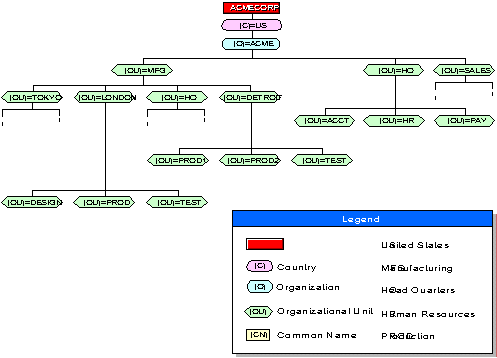
The following figure shows an example tree with a Country object, one Organization object, and multiple Organizational Units.
Directory Tree with an Organization Object and Multiple Organizational Unit Objects
You can designate geographic locations, projects, products, and so on, as Organizational Units (OU). An advantage to using a geographic structure for your Directory tree is that you can see where objects are physically located. Using geographical locations will assist in the placement of replicas.
Because one goal of having a Directory tree is to provide a static database that is updated infrequently, broad geographic designations in which objects remain static, such as states or cities, might provide a more stable structure for your tree than one that is continually changing.
However, if users or other resources are moved between locations frequently, their contexts can change dramatically even though the organization might not.
The following figure shows an example Directory tree in which the
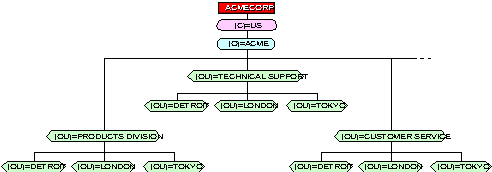
Directory Tree with Organizational Unit Designations at Different Levels
Organizational Units do not all have to be the same type. That is, you can designate a workgroup as an Organizational Unit and also designate a project as Organizational Unit.
You might want to organize your Directory tree by function if groups of users have the same functionality.
The following figure shows a Directory tree in which MFG (Manufacturing) and HQ (ACME Headquarters) represent departments, and Tokyo and London represent geographical locations, all under the Organization ACME.
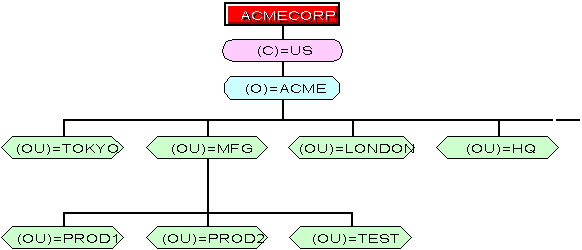
Directory Tree with Mixed Organizational Unit Object Types
Some areas of your tree might need more than one Organizational Unit. In the current example, the Organizational Unit MFG contains another level of Organizational Units because MFG itself is a self-contained business unit, with its own Quality Assurance department, Engineering and Development departments, and so on.
Therefore, another level of Organizational Units resides under the MFG Organizational Unit to allow the department network supervisors more flexibility in designing their portions of the Directory tree.
Having different Organizational Units can help network supervisors customize the Directory tree for their particular needs.
The tree in this example facilitates replication well, but it might be more difficult to manage than the example illustrated in ``Directory Tree with Organizational Unit Designations at Different Levels''.