Directory objects consist of categories of information, known as properties, and the data included in those properties. This information is stored in the Directory database.
The Directory database contains three general types of objects.
Directory objects are structures that store information, not the actual entity represented by the object. For example, a Printer object stores information about a specific printer and helps manage how the printer is used, but it is not the actual printer itself.
This Directory tree structure has the tree growing upside down, starting with the name of the tree or [Root] object at the top of the tree and branching downward. Once the [Root] object is named, you reference that object by its given name.
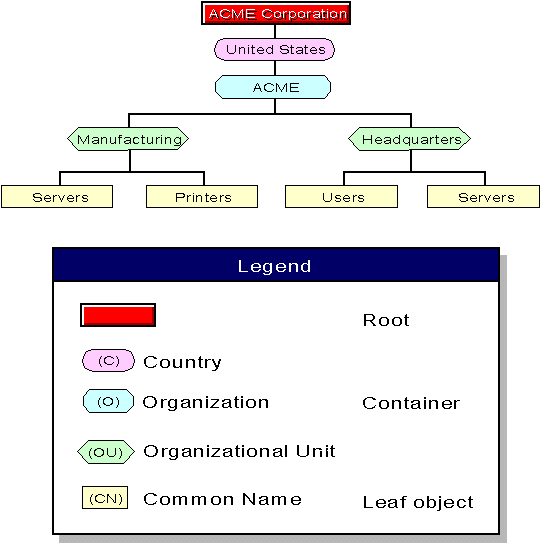
The following figure illustrates how objects can be laid out to form the Directory tree.
Objects Used in a Directory Tree
The Directory tree name ([Root] object) is automatically placed at the top of the tree during installation. Branches of the Directory tree consist of container objects and all of the objects they hold. Container objects can hold other container objects. Leaf objects are at the ends of the branches and do not contain any other objects.
The [Root] object represents the name of the Directory tree. It resides at the top of the tree and branches downward. Once the [Root] object is named, you reference that object by its given name.
The [Root] object can be created only by the NetWare Directory Services installation program, which automatically places it at the top of the tree. Once the [Root] object is named, it cannot be renamed or deleted.
Note that the [Root] object of a Directory tree should not be confused with the root directory in the file system. In the file system, the root directory is the first directory on a volume. It bears no relation to the [Root] object of a Directory tree.
The Directory tree name or [Root] object can have trustees, and rights granted to these trustees flow down the tree. A trustee is an object that is granted rights to work with another NDS object or with components of the file system, such as directories or files. One example is the User object ADMIN, which is created automatically during installation.
By default, ADMIN receives a trustee assignment including the Supervisor right to the [Root] object of the Directory tree. This gives ADMIN all rights to all objects and properties in the tree. Thus, ADMIN is used to initially log in and set up the tree. See ``User object ADMIN'' for more information.
The [Root] object can also be a trustee. Most likely, however, you will not assign trustee rights to the [Root] object. If you do, every object in the tree has the same rights as the [Root] object by virtue of inheritance. In effect, you assign every user that logs in rights to the [Root] object. See ``Object and property rights'' for more information.
Container objects hold (or contain) other Directory objects. Container objects are a means of logically organizing all other objects in the Directory tree. Just as directories are used to group related files together in a file system, container objects are used to group related objects in the Directory tree.
A container object that contains other Directory objects is known as a parent object.
There are four types of container objects, defined as follows:
Country objects are optional. They are typically used only if your organization spans multiple countries or if you must include a Country object to interact with other X.500 specification compliant directory services. For more information, see ``NDS and the X.500 specification''.
You can use a Country object to designate the country where your organization headquarters reside or, if you have a multinational network, to designate each country that is part of your network.
Because of the following considerations, you should plan to use a Country object only if your environment requires one:
Country objects add an extra organizational level to the name of each object in your Directory tree. For more information, see ``Context and names''.
Country objects require you to use typeful names instead of typeless names when referring to contexts within your Directory tree.
Locality objects are optional. You can use them to designate the region where your organization headquarters reside or, if you have a multinational network, to designate each area that is a part of your network.
Locality objects can reside under Country, Organization, and Organizational Unit objects. They can also hold Organization and Organizational Unit objects.
Note that the Locality object is not part of the NetWare default server installation. You can create a Locality object during the server installation.
You can use an Organization object to designate a company, a division of a company, a university or college with various departments, a department with several project teams, and so on.
Every Directory tree must contain at least one Organization object.
Organization objects must be placed directly below the [Root] object, unless a Country or Locality object is used.
You can use an Organizational Unit object to designate a business unit within a company, a department within a division or university, a project team within a department, and so on.
This object is optional. When used, Organizational Units must be placed directly below an Organization, another Organizational Unit, or a Locality object.
Directory leaf objects are objects that do not contain other objects. These represent actual network entities such as users, servers, printers, computers, and so on. You create leaf objects within a container object. See ``NDS object classes and properties'' for more information on leaf objects.
Each type of object (such as a User object, Organization object, or Profile object) has certain properties that hold information about that object. For example, a User object's properties include a login name, email address, password restrictions, group memberships, and so on. A Profile object's properties include profile name, login script, and volume.
Some objects require values for specific properties before setup of that object is complete. Other properties are optional and can be added later as the need arises.
The following table shows the relationship between object, property, and value:
| Object | Property | Value |
|---|---|---|
| User | Login name | Esayers |
| Email address | Esayers@ACME | |
| Telephone number | 555-1234 | |
| 551-4321 |
NetWare utilities allow you to search for objects that have specific property values. For example, you could search for all users who have a certain area code in their telephone number. The utility returns a list of all the objects with that area code in their telephone number property.
You can also request information on a specific object. The utility searches only for that object, and you receive information on that object's properties, provided you have the appropriate access rights.
To make searching for an object property easier, you can enter information for the optional properties when you create objects. This information can help you track and manage those objects.
Also, if you create objects or assign property values using a consistent format, you can use the NetWare Administrator, NETADMIN (see ``NETADMIN''), or nlist(1nuc) utilities to search for objects or property values.
For example, you might want to search for all User objects at a certain location, such as building M1. You cannot easily list all objects located in building M1 if you have entered ``Bldg. M1'', ``M1 Bldg'', and ``M-1'' as values in the Location property of various User objects.
Standardizing the value for the Location property for all User objects at the site (such as M1, M2, and M3) makes it easier to search for objects located in each building.
NetWare 4 software uses four different categories of rights:
Because the Directory tree is a hierarchical structure, rights assigned in the Directory tree flow down through the tree. This is an important concept to understand and consider when designing your Directory tree.
The concept of rights flowing down through the tree is referred to as inherited rights. This functionality is controlled by the Inherited Rights Filter (IRF). An IRF is a list of rights that can be assigned to objects in containers beneath a parent container within the tree hierarchy. It controls the rights that a trustee can inherit from container objects.
To allow you to better control access to NDS objects and their properties, object and property rights are assigned separately.
Rights that control access to an object as an entity are called object rights. Object rights control what trustees of an object can do with that object. Object rights do not allow the trustee to access information stored in that object's properties unless the trustee has the Supervisor object right, which includes the Supervisor property right.
The following list describes object rights you can assign to a trustee.
Note that all object rights of a subordinate object can be blocked by an Inherited Rights Filter (IRF) initiating at the point where the object right is granted.
To see the information in an object's properties, trustees must have the correct property rights. Property rights control access to each property of an object.
Keep in mind the distinction between object rights and property rights. While object rights control access to an object as an entity, property rights control access to the information stored as an object's property values. The only exception is the Supervisor object right. The Supervisor object right includes the Supervisor property right.
Property rights apply only to NDS object properties (and their values), not to the objects themselves. NDS allows you flexibility in deciding what property information others can access.
For example, if you include a telephone number as a property for a User object, you can prevent others from seeing the value associated with that property-that is, the actual telephone number-by using an Inherited Rights Filter to disable the Read right to that particular property. At the same time, you can still allow the person to view other properties and their values, such as the user's address.
The following list describes property rights you can assign to a trustee:
The information about who can access object properties is stored in a property known as the Access Control List (ACL). An object's ACL lists all trustees of the object. The ACL property also stores the object's Inherited Rights Filter.
To modify a trustee's access to an object, you change the trustee's entry in the object's ACL. Only trustees with the Write right for the object's ACL property can change trustee assignments or the Inherited Rights Filter.
Each trustee listed in an ACL can have different rights to that object's properties. For example, if ten users are listed in a Modem object's ACL as trustees, each of those ten users can have different rights to that Modem object and to its properties. One trustee might have the Read right, another might have the Delete right, and so on.
While trustee assignments grant access to an object, the Inherited Rights Filter (IRF) prevents rights from automatically flowing from a container object to the objects it contains.
In the Directory tree, a child object automatically receives, or inherits, rights granted to its parent objects. The IRF can be used to block any or all of these inherited rights so that no child objects receive them.
Through inheritance, every object and property in the Directory tree can have an Inherited Rights Filter.
The Security Equal To property lists other objects that you want a given object to have security equivalence to. The object is granted the same rights the objects in its list are granted, both to NDS objects and to files and directories.
Use the Security Equal To property to give a user access to the same information or rights another user has access to.
When a user is added to the membership list of a Group object or to the occupant list of an Organizational Role object, the Group or Organizational Role is listed in that user's Security Equal To list.
By using the Security Equal To property, you avoid having to review the whole directory structure and determine which rights need to be assigned to which directories, files, and objects.
The combination of inherited rights, trustee assignments in an ACL, and the Security Equal To property are known as effective rights.
An object's effective rights control its access to another object and that object's properties.