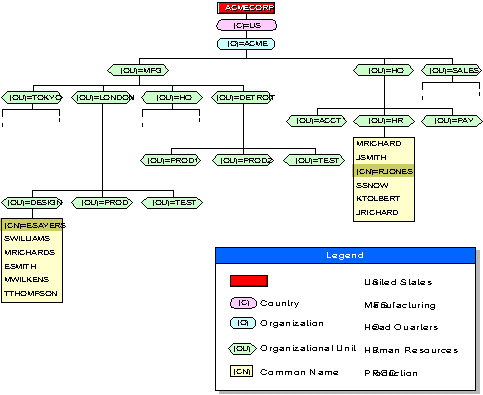
In NetWare Directory Services (NDS), context refers to the location of an object in the Directory tree. Context is important because NDS objects are identified by their relative location in the Directory tree.
The complete context, or path, from an object to the [Root] of the Directory tree in addition to the object's common name forms an object's Distinguished Name (also called the complete name). The context, or path, from an object to another object in the Directory tree forms that object's Relative Distinguished Name (RDN).
For example, in the following diagram, the following are true:
Context in a Directory Tree
Because names and contexts can be confusing for users, consider the following guidelines:
Because it is difficult for some users to remember long Distinguished Names with multiple layers of Organizational Units, you might choose to have no more than two or three levels in your Directory tree.
Because each object is identified by its location within the Directory tree, use a naming scheme that is both practical and functional for your organization.
For example, name servers for their function within a specific organization, and name printers for their type and location.
For example, if RJONES wants to use Accounting's printer, you can create an Alias object for that printer and put it in RJONES' context.
This way, RJONES can find the printer in his own context, and he doesn't have to remember the longer ``real'' name of that printer.
Spaces in object names appear as underscores in some utilities.
In other utilities, you might have to enclose the name in quotation marks to avoid having the utilities treat the two-word name as two separate commands or objects.