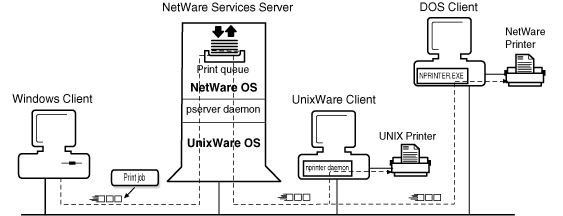
The printing capabilities of NetWare Services allow you to share print resources among NetWare clients, including DOS, Windows, UnixWare, and OS/2 clients. Implemented on the UnixWare platform and integrated with the UNIX lp(1) system, these print services provide nearly the same level of printing functionality found in the native NetWare printing environment. (NetWare Services supports AppleTalk network printers but does not provide the underlying protocol stacks necessary for AppleTalk printing.)
NetWare Services provides the connectivity between NetWare clients and network printers through a series of steps.
When a user sends a print job from an application on a NetWare client workstation, the application compiles the data entered by the user and passes it on to a print driver. The print driver generates the data and sends it along to default printer port on the workstation.
The print job travels across the network and arrives at the NetWare Services server, where it is stored as a file in a designated NetWare directory. This directory is called a print queue. Print queues are assigned to network printers.
The print job resides as a file in the print queue until the network printer is ready. Each network printer has a designated print server assigned to it. The print server monitors the print queues and transfers pending print jobs from the queues to the printer.
Network printers can be defined as local or remote and can be UNIX or NetWare printers. A local printer is a printer attached directly to the NetWare Services server; a remote printer is a printer attached to a UNIX or NetWare client workstation on the network, or directly to the network itself.
Most network printers require a port driver to print network print jobs. NetWare Services provides two types of port drivers: NPRINTER.EXE and the NPRINTER daemon. Network printers attached to DOS, Windows, or OS/2 client workstations require NPRINTER.EXE running on the workstation. Network printers attached to NetWare Services servers or UNIX servers require the NPRINTER daemon running on the server.
A typical path of a NetWare Services print job
For more information on the PSERVER daemon, see ``Using the PSERVER daemon''. For more information on NPRINTER, see ``Using the NPRINTER daemon''.