NetWare Services supports existing network-direct printers and hardware queue servers produced by various manufacturers. These devices either connect to a printer and then to the network or are installed in a port at the printer.
In many cases, these devices offer a fast, effective, low-cost printing solution in NetWare Services as well as NetWare 3 environments.
Typically, these print devices are shipped with their own installation utilities. The manufacturer's utilities configure the device to recognize network print components and to communicate with the network. To effectively use network-direct print devices in a NetWare Services environment, you will need to know the manufacturer's procedures for installing the specific device that you are using.
Many of these devices can be configured to run in either remote server mode (see ``Remote printer mode'') or queue printer mode (see ``Queue server mode'').
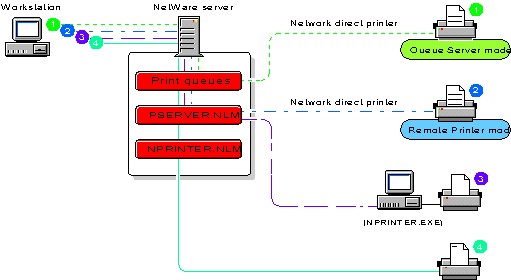
The following figure illustrates a representative native NetWare 4 network printing setup incorporating network-direct print devices used in both remote server and queue printer modes.
Network-Direct Print Devices Running on Same Network with Printers Attached to a Workstation and a NetWare Server