Using NETUSER
The following illustration shows the use of the NETUSER
utility.
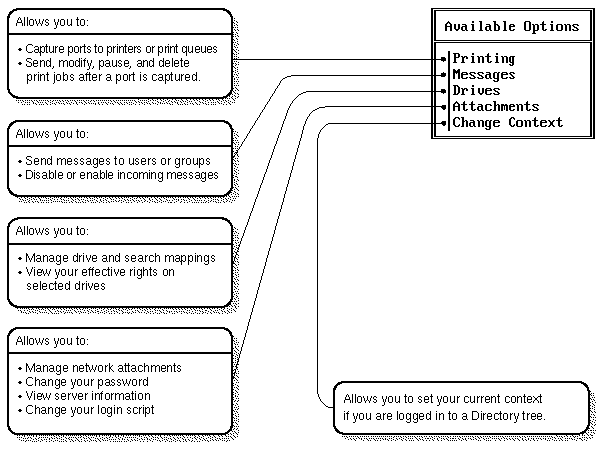
NETUSER tasks
To capture a printer, do the following:
-
At the NETUSER Available Options menu, choose
an LPT port under ``Printing''. (Press <F4> to toggle between
NetWare Directory Services and bindery modes.)
-
Select ``Change Printers''; then choose a printer or print queue from
the Printers/Print Queues menu.
To print a job:
-
At the NETUSER Available Options menu, select a port
that has been redirected to a network printer or print queue under
``Printing''.
-
Select the ``Print Jobs'' option. Press <Ins> and follow the instructions
in the information lines.
-
When you are finished with the screen ``New Print Job to be Submitted'',
press <F10> or <Esc> and choose ``Yes'' to save changes and print.
To attach to a NetWare server:
-
At the NETUSER Available Options menu, select
``Attachments''; then press <Alt>+<F10> to display more options at the
bottom of the screen.
-
Press <Ins> to display a list of available servers.
-
Press <F1> for help from here.
© 1999 The Santa Cruz Operation, Inc. All rights reserved.
UnixWare 7 Release 7.1.1 - 5 November 1999