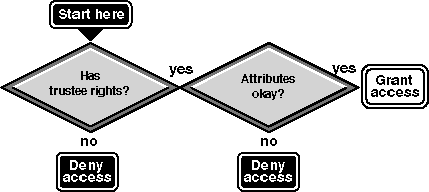
When NetWare is selected as the mode for file access control, rights checking is the same as it is on native NetWare. NetWare Services checks that the user has NetWare rights to the file or directory and that the NetWare file and directory attributes allow the action. ``NetWare Security Checks'' illustrates this process.
NetWare Security Checks
If NetWare is the access control mode, the UnixWare permission bits are not checked at all. For client access, if files owned by Root are placed in the NetWare volume and NetWare rights allow the user to access the file, the user is allowed access.
NetWare must calculate a user's effective rights, or rights the user can exercise, to each file and directory. This is because effective rights are determined by a combination of the Inherited Rights Filter, trustee assignments, and security equivalences.
The following basic rules are used:
If multiple trustee assignments have been granted to an object ID in a branch of the tree, NetWare Services uses the trustee assignment closest to the node in question for all rights except the Supervisor right.
NetWare Services searches to the root of the volume to verify whether the Supervisor right has been granted. Since the Supervisor right cannot be revoked except in the directory where it was granted, this right overrides trustee assignments in lower directories, as well as modifications to Inherited Rights Filters.
NetWare Services has one volume attribute, Read-Only. It overrides any UnixWare permissions that would allow NetWare users to write to or create files in the volume.
NetWare has a number of file and directory attributes (Delete-Inhibit, Read-Only, Rename-Inhibit, and so on) which are enforced for NetWare users.
Since only NetWare is used to control file access, all client access control must be set up with the NetWare utilities (such as NETADMIN, NetWare Administrator, FILER, RIGHTS, or FLAG for attributes). NetWare utilities should also correctly display the user's effective rights.