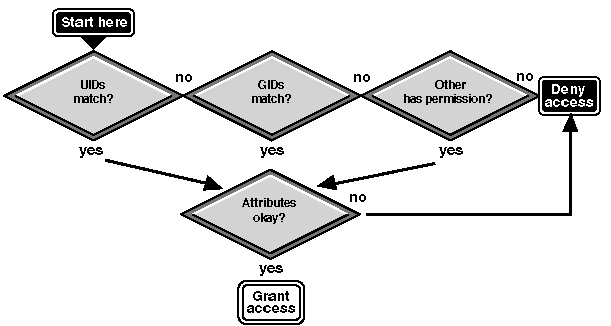
When UNIX is selected as the mode for file access control, the UnixWare permission bits are used to calculate effective NetWare rights to a file or directory. Each NetWare Services user has a UID and a GID and these are compared with the file or directory's UID and GID. The UID and GID are established by default or through the hybrid user feature.
``UnixWare file access control checks'' illustrates this process.
UnixWare file access control checks
NetWare Services users can have a match on more than one UID. The UID matches under the following conditions:
The GIDs match under the following conditions:
Two NetWare rights, Supervisor and Access Control, are never granted, since granting them would imply that the user can use NetWare trustee assignments to control access. With UNIX as the mode for file access, access control changes must occur from UnixWare.
The following table shows how UnixWare rights are translated to NetWare rights.
Translating UnixWare permissions to NetWare rights
| UnixWare permissions | NetWare effective rights | ||
|---|---|---|---|
| Parent Directory | File or Directory | File | Directory |
| --- | Any | No Rights | No Rights |
| r | Any | No Rights | No Rights |
| rw | Any | No Rights | No Rights |
| wx | Any | No Rights | No Rights |
| x | Any | No Rights | No Rights |
| w | Any | No Rights | No Rights |
| wx | Any | No Rights | No Rights |
| rwx | --- | CEF | No Rights |
| rwx | r | RCEF | No Rights |
| rwx | rw | RWCEF | RWCEF |
| rwx | rwx | RWCEF | REF |
| rwx | rx | RCEF | No Rights |
| rwx | w | WCEF | No Rights |
| rwx | wx | WCEF | No Rights |
| rwx | x | CEF | No Rights |
| rx | --- | F | No Rights |
| rx | r | RF | No Rights |
| rx | rw | RWF | No Rights |
| rx | rwx | RWF | RWCF |
| rx | rx | RF | RF |
| rx | w | WF | No Rights |
| rx | wx | WF | No Rights |
| rx | x | F | No Rights |
In addition to mapping UID and GIDs and converting UnixWare permissions into NetWare rights, the following rules are used to determine UnixWare access to a file or directory:
For the user to access a file in the current directory, the user must have r and x permissions to the current directory, as well as some file permissions.
NetWare Services has one volume attribute, Read-Only. It overrides any UnixWare permissions that would allow NetWare users to write to or create files in the volume.
NetWare has a number of file and directory attributes: Delete-Inhibit, Read-Only, Rename-Inhibit, and so on) which are enforced for NetWare users.
The hybrid variables affect the UnixWare enforcement of the permission bits.
Hybrid users are granted rights to files and directories that match with their hybrid UID and GID as well as to all files and directories owned by nwuser or nwgroup.
Since NetWare users who are not hybrid users use nwuser and nwgroup as their default UID and GID, all files and directories that these users create are accessible to all hybrid users.
If this is a security problem, you can set the ``Hybrid Allow Default User'' variable in NetWare Setup to ``No''. This forces every NetWare user to be a hybrid user in order to log in to the NetWare server. But it also allows all the UnixWare files and directories created from NetWare to be owned by the UnixWare user who created them.
If the NetWare volumes are NFS-mounted, set the ``Allow Processes to Assume Hybrid User IDs?'' variable in NetWare Setup to ``Yes''.
Forcing all NetWare users to be hybrid users is the best method of enforcing security with the ``UNIX'' mode for file access. In this mode, all NetWare users should have sufficient rights to the files and directories that they create to control access from UnixWare.
Since neither the Supervisor or the Access Control right is ever granted on volumes with UnixWare-made access control, all the NetWare utilities (FILER, NetWare Administrator, NETADMIN, and RIGHTS) that allow users to make trustee assignments will return with an insufficient rights error. Therefore, even the NetWare administrator has insufficient rights to make trustee assignments.
Changes to
NetWare rights must be done from UnixWare using
UnixWare utilities. Hybrid users on
DOS workstations can use
NVT2 (Novell Virtual Terminal 2)
through Host Presenter
to access the UnixWare side of the NetWare
Services server and change permissions.
(Novell Virtual Terminal 2)
through Host Presenter
to access the UnixWare side of the NetWare
Services server and change permissions.
OS/2 clients can use NVT2 from a DOS session. For more information, see Terminal Emulators for DOS/Windows.
The NetWare utilities that display a user's rights should accurately display the user's effective rights as they have been translated from the UnixWare permissions.