Understanding the import process
The process for importing records from your database
into the NDS database is as follows:
-
Generate a data file (a delimited ASCII
text file) from your existing database records.
Most applications let you save data as a
comma-separated ASCII text file with quotation
marks as delimiters.
-
Create an import control file to interpret the data file.
You can create the import control file using
any text editor under DOS or OS/2. This
file defines how records in the data file
are imported into NDS and which fields
(properties) the data will be placed in.
-
Create User objects using UIMPORT
to transfer data from your database to the NDS
database.
``Import process''
gives you a general overview of the import process.
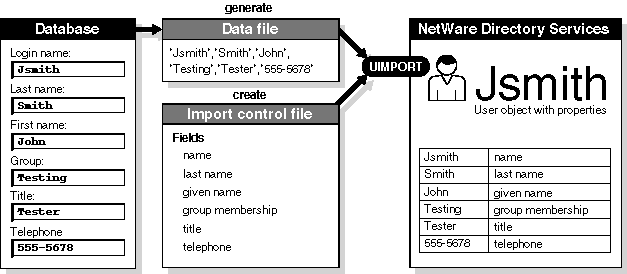
Import process
© 1999 The Santa Cruz Operation, Inc. All rights reserved.
UnixWare 7 Release 7.1.1 - 5 November 1999