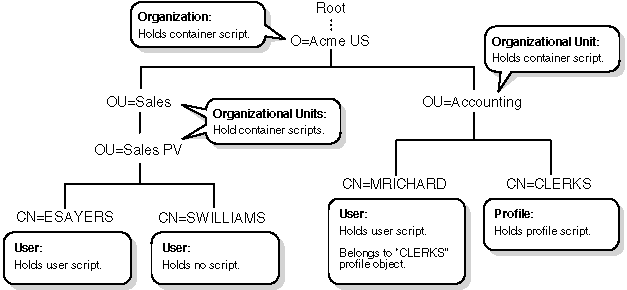
Maintaining many user login scripts can be time consuming. Therefore, you should try to include as much customizing information as possible in the container and profile login scripts.
Here are some suggestions:
Login scripts are properties of objects. The following table shows which objects can contain which login scripts:
Objects that contain login scripts
| Object | Type of Login Script |
|---|---|
| Organization | Container |
| Organizational Unit | Container |
| Profile | Profile |
| User | User |
Where login scripts are located
In the previous figure, there are three users: ESAYERS, SWILLIAMS, and MRICHARD. The following table shows which login scripts execute when each of these users logs in.
| When this user logs in | Login scripts execute in this order |
|---|---|
| ESAYERS |
|
| SWILLIAMS |
|
| MRICHARD |
|
For example, in ``Where login scripts are located'', although there are two levels of container objects above users ESAYERS and SWILLIAMS, only the container login script for the container they are in (OU=SALES_PV) executes.
If the SALES_PV Organizational Unit had no container login script defined, no container login script would execute for ESAYERS and SWILLIAMS, even though a container login script exists at a higher level.
Because user SWILLIAMS has no user login script defined, the default login script executes after the container login script.
Since user MRICHARD belongs to the profile CLERKS, the CLERKS profile
login script executes before MRICHARD's user login script. Users can
be assigned to only one Profile object, but other profile login scripts
can be specified at the command line, for example,
LOGIN username /p profile_object
You can, however, assign users to more than one Group object. Then use the MEMBER OF group identifier variable to specify that different parts of a login script execute, depending on the Group objects to which the user belongs.
For more information about using the MEMBER OF group identifier variable in login scripts, see ``IF...THEN'' and ``Identifier variables''.