NetWare Services includes a security feature, NCP packet signature, that protects servers and clients using the NetWare Core Protocol.
NCP packet signature prevents packet forgery by requiring the server and the client to ``sign'' each NCP packet. The packet signature changes with every packet.
NCP packets with incorrect signatures are discarded without breaking the client's connection with the server. However, an alert message about the invalid packet is sent to the error log, the affected client, and the message monitor. The alert message contains the login name and the station address of the affected client.
Because the packet signature process consumes CPU resources and slows performance, both for the client and the NetWare server, NCP packet signature is optional.
Several signature options are available, ranging from never signing NCP packets to always signing NCP packets. NetWare servers and clients both have four settable signature levels.
The signature options for servers and clients combine to determine the level of NCP packet signature on the network.
NCP packet signature is not required for every installation. Some network supervisors may choose not to use NCP packet signature because they can tolerate security risks in the following types of situations:
Security is a major concern for administrators and users when working with files and directories on the network. Several types of security exist in NetWare Services:
The following list describes the prerequesites:
The ``NetWare Server Security'' window appears.
Use ``NCP Packet Signature Option'' in the previous procedure to assign server packet signature levels.
Client signature levels are assigned in the NET.CFG
file at the client workstation as follows:
signature level = number
To replace the existing number with Disabled (0), Enabled (1), Preferred (2), or Required (3), use NetWare Settings for NUC at the UnixWare desktop; use a text editor for DOS, Windows, or OS/2 clients. The default is Enabled (1). The levels are explained in the following list:
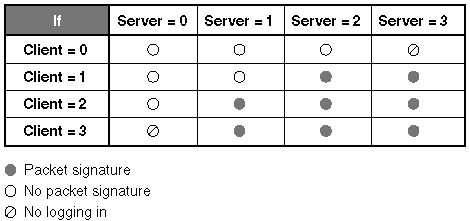
The packet signature levels for the server and the client interact to create the ``effective packet signature'' for the network. Some combinations of server and client levels do not allow logging in.
``Effective packet signature of server and client'' shows the interactive relationship between the server packet signature levels and the client signature levels.
Effective packet signature of server and client
The default NCP packet signature level is Enabled (1) for clients and Preferred (2) for servers. In general, this setting provides the most flexibility while still offering protection from forged packets.
The following are examples of using different signature levels:
If an intruder gains access to any information on the NetWare server, it could damage the company. The network supervisor sets the server to level 3 (Required) and all clients to level 3 (Required) for maximum protection.
The NetWare server has a directory for executable programs and a separate directory for corporate finances (such as Accounts Receivable). The network supervisor sets the server to level 2 (Preferred) and the clients that need access to Accounts Receivable to level 3 (Required). All other clients remain at the default, level 1 (Enabled).
The network supervisor is uncertain which employees will be using which workstations, and the NetWare server contains some sensitive data. The network supervisor sets the server to Required (3). Clients remain at the default Enabled (1).
An unattended workstation is set up for public access to nonsensitive information, but another server on the network contains sensitive information. The network supervisor sets the sensitive server to Required (3) and the unattended client to Disabled (0).
The default server packet signature option is Preferred (2). To change the option, use the ``NCP Packet Signature Option'' in the scoadmin NetWare Setup utility. See ``Server signature levels''.
The default client packet signature level is Enabled
(1). To change the level, add the following
parameter to the NET.CFG file of each DOS
or Windows workstation:
signature level = number
Replace number with 0 (Disabled), 1 (Enabled), 2 (Preferred), or 3 (Required).
The default client packet signature level is Enabled
(1). To change the level, add the following
parameter to the NetWare Requester area of the
NET.CFG file for each OS/2
workstation:
signature level number
Replace number with 0 (Disabled), 1 (Enabled), 2 (Preferred), or 3 (Required).
This signature level applies to all NUC clients unless it is set in a user-specific NET.CFG file.
The default packet signature level is Enabled. To change the level, use the nwsignatures(1Mnuc) utility.