Because NetWare Services volumes are paths into the UnixWare file system ``/'', they are dependent upon the UnixWare file system for partition statistics.
In the example in ``NetWare volumes compared with the UnixWare file system'', the UnixWare file system has only one file system but three NetWare volumes. Each volume reports the same amount of disk space for the UnixWare partition.
This is quite different from native NetWare. The native NetWare file system allows the NetWare partition to be segmented (SYS:, HOME:, and WORK:), and these segments are then assigned to volumes. Volume statistics reflect the actual disk space that has been assigned exclusively to the volume.
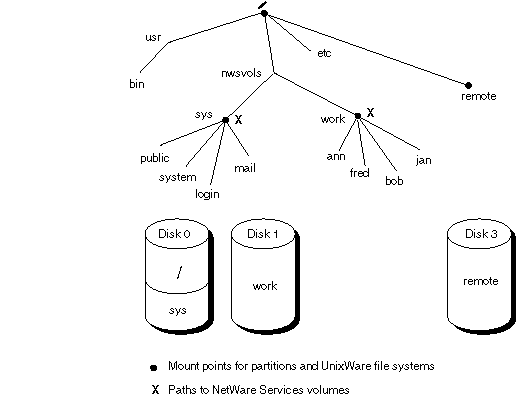
NetWare Services can mimic this behavior if the UnixWare file system is configured to accommodate NetWare. ``Possible volume configuration'' illustrates one method for configuring the file system.
Possible volume configuration
If the UnixWare file system is configured so that file system mount points coincide with paths to NetWare Services volumes, NetWare volume statistics will be accurate.
In ``Possible volume configuration'', volume SYS: corresponds to the mount point for Disk 0, Partition 2. Volume WORK: corresponds to the mount point for Disk 1 (which has one partition).
Disk 3 is a remote disk and is mounted at the root. It is not a NetWare volume, but it can become one if a path is specified in the NetWare Services voltab file. It also can become part of a NetWare volume if it is mounted in a volume subdirectory, for example under /nwuvols/work/bob.
If Disk 3 is mounted at bob, NetWare users can expect the following behavior: