Configuring a rotation scheme

Follow the steps below to set up a rotation job:

1. If the Backup Job Type is not set to Rotation, click on the Rotation option.

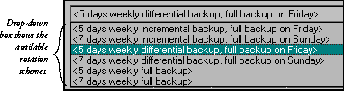
2. Select Rotation Cycle Table (tab #1) from the drop-down box at the top of the panel, then select the type of rotation scheme you want.

3. Customize your selected rotation scheme.

4. To evoke the Job Unit dialog box, right mouse click on the Day of the Week icon.

5. Click the Submit button.