


The ARCserveIT host server is the server from which the backup job will run. The host server also determines the available destination devices for the backup job. The device groups attached to the host server are those that are available to you as the backup destination.
To select the ARCserveIT host server for your backup job follow the steps below:
1. From the Backup Manager window, click on the drop-down host server box. 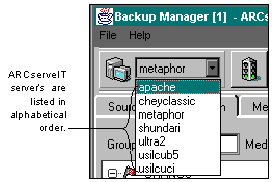
A list of servers within the ARCserveIT domain currently running ARCserveIT services, will be displayed.
2. Select the name of the server that you want to use.
The name of the server you have selected will be displayed in the host server box. The server you select from this list is now your default server and will appear on all subsequent screens until you select another server.