


Schedule a repeating backup using the Custom option, if you want a job to repeat at specified intervals, but you do not want to keep submitting the job manually.
Follow the steps below to run a repeating job:
1. Select your source and destination.
Select any sources, options, and then the destination for this job.
2. Select the Method/Schedule tab from the Backup Manager window.
The Backup Job Type, "Custom" is selected.
3. Select the Repeating Intervals tab (if not already selected).
4. Decide when you want the job to run.
Select the repeating interval and the days to exclude. 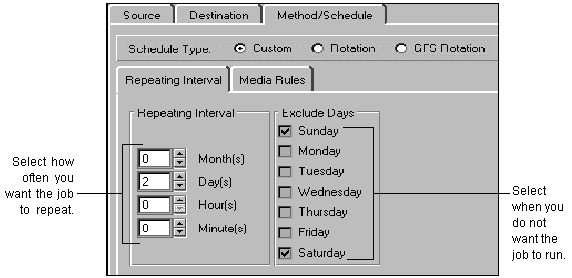
This job is set to run every other day, except weekends.
5. Select the Submit button  from the Backup Manager's Menu Button Bar.
Enter a description for the backup job.
6. Click OK to submit the job.
Once the job is complete you can monitor the ARCserveIT log files for information about the job. See `Viewing details about a job' for more information.