


Use the Date filter to include or exclude files based on a specific date and time or a date range. You can use a date range to specify whether to include or exclude files that were created, modified, or last accessed on or between this date range.
| The Date Filter when used to filter files based on their creation date, does not apply to files residing on UNIX platforms. |
| The Date filter can be applied locally (per host) and/or globally (per job). For procedural information see `Applying filters - the basic steps'. In addition, this filter does not apply to UNIX platforms. |
Follow the procedure below to filter files based on their date:
If you select Exclude, all files will be backed up or restored EXCEPT for those that match the Date filter you specify.
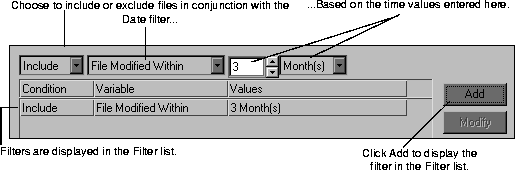
The above window illustrates a scenario where in order to save time, you only want to include files that have been modified within the last three months.
If you are applying the filter locally (per host), it will be applied when the job is run. If you are applying the filter globally (per host), proceed to Step 5.

