


The Preserve Media field indicates (tells GFS rotation how many daily, weekly, and monthly media to save before reusing any of them. Following is a description of each type of media:
If you picture each type of media stored in its appropriate 'bin', then it becomes easier to understand how GFS rotation reuses media. Consider the default GFS rotation setup where you are doing a full backup every day and "preserving" 4 daily media, 5 weekly media, and 12 monthly media:

You would use the daily media (from the daily bin) on Monday, Tuesday, Wednesday, and Thursday. On Friday, which is the last full backup of the week, you would use media from the weekly bin. On the last full backup of the month, regardless of what day it falls on, you would use media from the Monthly bin.
When setting up your GFS rotation set, keep in mind how many daily backups are being performed each week. Consider the default GFS rotation set, where four is the number of daily media to preserve before rotation. This is because on Monday through Thursday, a daily backup is being performed. On Friday, the weekly backup is performed. The next Monday, you want to start over again, reusing the previous week's daily media. If you changed the scheme so that you were performing backups only on Tuesday and Thursday, with a weekly backup on Friday, then you should change the daily media to preserve to be two.
The minimum number of daily media required per week is the number of daily backups you are performing.
Consider the scenario where you want to rotate rotate (re-use) your daily media often, and save the monthly media for a year in order to store them off-site. For this example, you could use the default setting where you would need 21 media total (4 daily media, 5 weekly media and 12 monthly media):
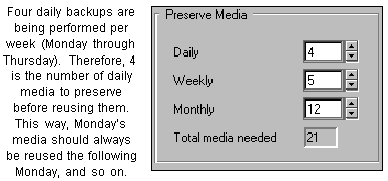
The number of daily media to preserve should match the number of daily backups you perform per week. The range for Preserve Media - Daily is 0-9999.
The default setup for weekly backups is five. Some months, depending on your GFS rotation setup, you will have five weekly backups performed before the monthly backup takes place. You don't want to start recycling your weekly backups before a monthly backup occurs. The range of valid values for preserving weekly media is 0-9999.
The default setup for monthly backups is twelve. Monthly backups are considered the only form of 'permanent' backup, so in general, you want to take these off-site for storage, and don't want to recycle the media. The range of valid values for preserving monthly media is 0-9999.
GFS rotation will start re-using media after making the number of backups that you specified in the Preserve Media fields. For the default setup, GFS rotation will need to make 4 daily backups before it can start re-using the daily media, 5 weekly backups before it can start re-using weekly media, and 12 monthly backups before it can start re-using monthly media. When you first start GFS rotation, you will need a blank daily media for Monday through Thursday's backup. On the following Monday, GFS rotation will start recycling the daily media by using the oldest one (last Monday's) first.
As shown, the GFS name prefix selected is "ENGINEER". Assuming the first backup is on March 7, 1997, after the first week the bins would look like the following: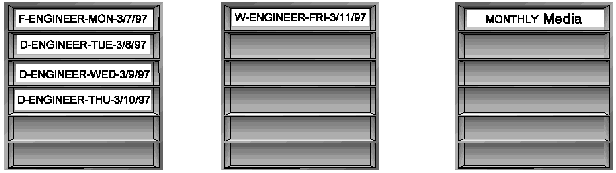
On Monday, March 14, 1997, GFS rotation would re-use the media named F-ENGINEER-MON-3/7/97. (This media was named with an 'F' instead of 'D' because the first backup of an GFS rotation set is always a full backup, regardless of the type of backup method selected.)
On Monday, March 28, 1997, the bins would look like this: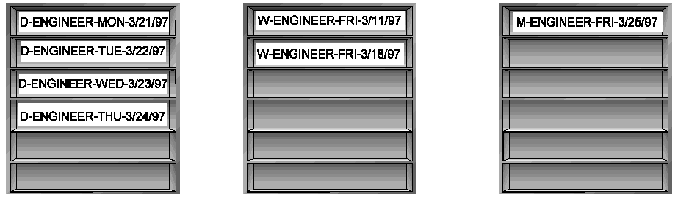
| GFS rotation always recycles the oldest media first. It gets this information from ARCserveIT's database. You can always determine which media GFS rotation needs next by looking in the `GFS Rotation/Rotation Daily Log', under the Reports Manager. |

