


You must have at least one storage device attached to the SCSI port of your workstation (or server) to back up and restore data using ARCserveIT.
ARCserveIT uses the names of the planets in our solar system, (excluding Earth), to label device groups. (The planets are Mercury, Venus, Mars, Jupiter, Saturn, Uranus, Neptune, and Pluto.) Depending on the type of SCSI card you have connected, you can have up to 7 or 15 storage devices per SCSI adapter card, connected to your host.
ARCserveIT will only configure the first 7 devices found on the primary SCSI card using the planet names, one device per group.
If your primary card has more than 7 devices, additional devices will be configured into groups labeled using a prefix of "Group", and a suffix numbered sequentially starting at zero. In the event that your system is configured with a second SCSI card, ARCserveIT will not recognize the devices on that card until the Media Server (asmediad) has been initiated. Once initiated, the Media Server will assign the devices on the second card (and subsequent cards) using the "Group" label.
You can then modify these device group assignments and names using the ARCserveIT Device Manager.
ARCserveIT assigns SCSI ID's to the devices within each device group.
ARCserveIT assigns devices into separate groups so that you can take advantage of Parallel Streaming. Parallel streaming allows two or more jobs to run at the same time. To run two jobs at the same time, you must have two drives, each in a separate group.
For example, you could assign drives 1 and 2 to a group called "GROUP1" and assign drives 4, 5, and 6 to a group called "GROUP2". You could then have a backup job running for GROUP1 while a restore job runs for GROUP2.
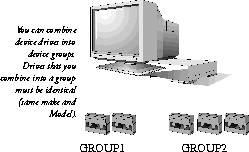
If you associate/assign multiple drives to one group, you will be able to take advantage of "drive spanning". Drive spanning means that, under the right circumstances, when one tape becomes full, the session will automatically span to the next drive in the same group.
Grouping tape drives has the following distinct advantages:
For information about setting up and configuring device groups, see the `Configuring device groups' section later in this chapter.
The rest of this chapter describes how to get information about tape devices, how to interpret this information, how to set up device groups, and how to maintain your media.