Servers in a domain form a single administrative unit, sharing security and user account information, thereby saving administrators and users time and effort.
By grouping computers into domains, network administrators and users benefit in the following ways:
Servers in a domain form a single administrative unit, sharing security and user account information, thereby saving administrators and users time and effort.
Users browsing the network for available resources see the network grouped into domains rather than as individual servers and printers on the whole network. (This benefit is identical to the Windows for Workgroups and Windows 95 concept of a workgroup.)
Trust relationships move the convenience of centralized administration from the domain level to the network level. By establishing trust relationships between the domains on your network, you enable user accounts and global groups to be used in domains other than the domain in which these accounts are located. You need to create each user account only once and the account can be given access to any computer on your network — not just the computers in one domain.
Trust relationships are created only between Advanced Server or Windows NT Server domains. When administering member servers, computers running Windows NT Workstation, or a LAN Manager 2.x domain, the Trust Relationships command is unavailable.
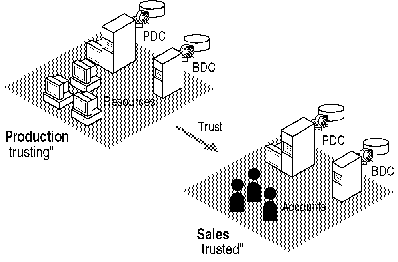
The following diagram illustrates a trust relationship between two domains that contain both resources and accounts.
Note

The arrows in diagrams showing trust relationships always point from the resources that can be used to the accounts that are trusted to use them.
One-way trust relationship
In the preceding diagram, user accounts from the Sales domain can use resources in the Production domain. The effect of this trust is that users from Sales can log on to their domain and receive access to servers in the Production domain, and they can do so from any workstation in either domain. Users from Sales can be added to local groups in the Production domain. Users in Production, however, cannot belong to local groups in the Sales domain, log on to the Production domain from Sales workstations, nor connect to servers in the Sales domain.
One common scenario for a one-way trust is for a domain containing only accounts to be trusted by one or more resource domains. That trust configuration results in all accounts being trusted to use all resources.
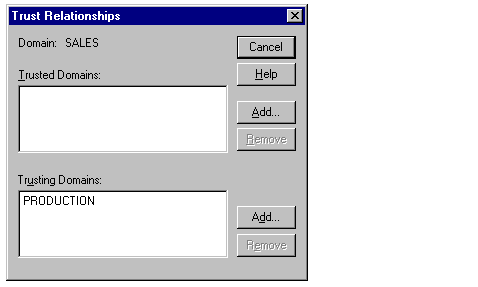
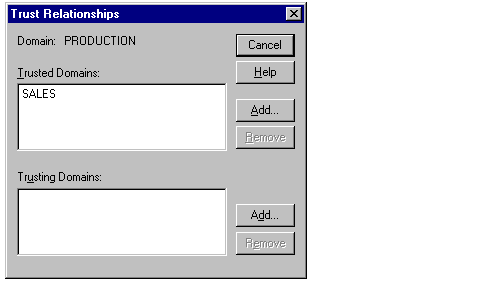
To create trust relationships, use the Trust Relationships command on the Policies menu in User Manager for Domains. Creating a one-way trust relationship requires two steps: first one domain (the domain that is to be the trusted domain) must add a second domain (the domain that is to be the trusting domain) to the list of domains that trust it. Then the trusting domain must add the trusted domain to the list of domains that it trusts. Because the trust relationship is not yet established, these two steps may need to be performed by separate administrators.
It is best to establish the Trusting Domain relationship first, followed by the Trusted Domain relationship. This order allows the password used for setting up the relationship to be verified immediately when the relationship is first used.
For information on how to create a trust relationship, see "Adding a Trusting Domain" and "Adding a Trusted Domain" in User Manager for Domains Help.
Trust relationships between domains also can be established by using the net trust command. For more information, type net help trust at the Advanced Server command prompt.
To remove a trust relationship, you must remove both halves of the trust. From the trusting domain, remove the trusted domain. From the trusted domain, remove the trusting domain.
Important
When an administrator establishes a trust relationship between two domains, a computer account is created to be used by computers in the trusting domain to establish secure communications to the trusted domain. The password for this account is given at the time that the trust relationship is established. This password is changed periodically by the trusting domain server software. If a trust relationship is broken, both sides of the trust relationship must be dissolved — the trusting domain must cease to trust the trusted domain and the trusted domain must cease to permit the trusting domain to trust it. When you reestablish the trust relationship, you again must store matching passwords for the trusting and trusted domains. If only one side of the trust relationship is broken and reestablished, trust will appear to work in some ways and fail in others. For example, it will be possible to grant resource access to a user from the trusted domain, but the user will not actually be granted the indicated access.
The User Manager for Domains that is included in the Windows NT Server Tools program group for Windows 95 computers has limitations that affect the administration of trusted domains. You should consider them when planning your network. (Note that these limitations do not affect the Windows NT Administrative Tools program group which is installed on Windows NT Workstation computers.)
In order to use the Trust Relationships dialog box to trust another domain, and the Add Users and Groups dialog box to grant privileges and group memberships to users in a trusted domain, at least one of the following conditions must exist:
The other domain already must trust your domain.
The domain account that you are logged on to has the same name and password as an account in the other domain.
The other domain has enabled its Guest account, and the domain account that you are logged on to does not have the same name as any account in the other domain.
Additionally, the User Manager for Domains that is included in the Windows NT Server Tools program group cannot verify trust relationships between domains. Be sure to enter correct passwords for the trust relationship. IIf you are performing this procedure from Windows NT Server Tools, you will receive a message indicating the trust relationship could not be verified.
In an Advanced Server environment, access for a single user across multiple domains generally can be arranged by adding an account with the same user name and password to each domain. If a user matches the user name and password, access is given regardless of which domain the user is logged on to.
The exception to this rule is when trust relationships are in operation. If a trust relationship is established between two domains, then the trusting domain is able to distinguish users in the trusted domain from users in the local domain — even if they have the same name and password.
Consider three domains: Athens, Berlin, and Cairo. Each domain has a global user account, MasterAdmin. MasterAdmin has the same password and is a member of the global group Domain Admins in each domain. The Athens domain trusts the Berlin domain but no other trust relationships are established.
The following table describes the access that MasterAdmin has while logged on to each domain:
|
Logged On |
Can Administer |
Cannot Administer |
|
Athens |
Athens, Berlin, Cairo | |
|
Berlin |
Berlin, Cairo |
Athens |
|
Cairo |
Athens, Berlin, Cairo |
It would appear that the trust relationship between Athens and Berlin has restricted the access of the MasterAdmin user across the domains. In fact, the trust relationship has made access more controllable. The Athens domain now can distinguish the user Athens\MasterAdmin from the user Berlin\MasterAdmin and grant access accordingly.
In order for MasterAdmin to administer the Athens domain from Berlin, the user Berlin\MasterAdmin should be added to the Domain Admins global group in the Athens domain. If the password for the Berlin\MasterAdmin account changes, it could be used to administer Athens but not Cairo.