Because maintaining permissions for a group is easier than maintaining permissions for many user accounts, you generally will want to use groups to manage access to resources such as directories, files, or printers. To assign permissions or rights to a set of users, assign the permissions or rights to a group and then grant membership in the group to each of the users.
Note
When assigning user capabilities, remember to take advantage of the built-in groups provided with Advanced Server which have been granted useful collections of rights and capabilities. For example, members of the Administrators group have administrative capabilities in the domain and over the servers of the domain.
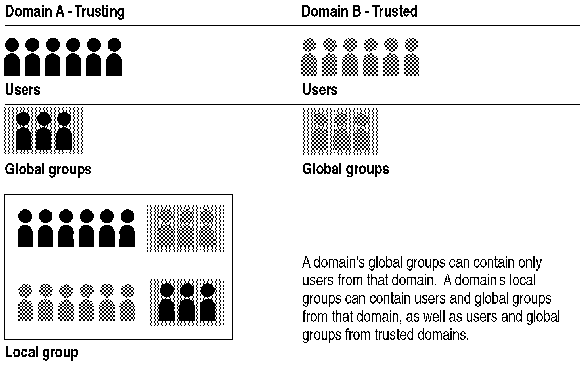
Two types of groups can be maintained in an Advanced Server domain: local groups and global groups.
A global group contains a number of user accounts from one domain that are grouped together under one group account name. A global group can contain only user accounts from the domain in which the global group is created. After a global group is created, it can be granted permissions and rights in its own domain, on workstations or member servers, or in trusting domains. However, it is best to grant rights and permissions to local groups and use the global group as the method for adding users to local groups.
Global groups can be added to local groups in the same domain, to domains that trust that domain, or to member servers or computers running Windows NT Workstation in the same or a trusting domain. Global groups only contain domain user accounts. You cannot create a global group on a computer running Windows NT Workstation or on computers running Windows NT Server as a member server.
The "global" in "global group" indicates that the group is available to receive rights and permissions in multiple (global) domains.
A global group can contain only user accounts; it cannot contain local groups or other global groups.
A local group contains user accounts and global group accounts from one or more domains, grouped together under one group account name. Users and global groups from outside the local domain can be added to the local group only if they belong to a trusted domain. Local groups make it possible to quickly assign rights and permissions for the resources on one domain (that is, the local domain) to users and groups from that domain and other domains that it trusts.
Local groups also exist on member servers and computers running Windows NT Workstation, and can contain user accounts and global groups.
The "local" in "local groups" indicates that the group is available to receive permissions and rights in only a single (local) domain.
A local group cannot contain other local groups.
The following table summarizes how the two types of groups are used.
|
If |
Need to be used in |
You can put them in |
|
User accounts from this domain |
The domain controllers, member servers, and workstations of this domain, or of other domains |
A global group |
|
User accounts from this domain or other domains |
The domain controllers of this domain |
A local group |
|
Global groups from this domain or other domains |
The domain controllers of this domain |
A local group |