Strategies for Using Groups
A local group is a single security entity that can be granted access to many objects in a single location (a domain, or a workstation or member server).
With global groups you can group user accounts which might be granted permissions to use objects on multiple domains and workstations.
For example, in a multiple-domain setting, you can think of global groups as a means of adding users to the local groups of trusting domains. To extend users’ rights and permissions to resources on other domains, add their accounts to a global group in your domain and then add the global group to a local group in a trusting domain.
Even if you maintain a single domain, keep in mind that additional domains may be added in the future. You can use global groups added to local groups for granting all rights and permissions. Later, if another domain is created, the rights and permissions assigned to your local groups can be extended to a new domain’s users by creating a trust relationship and adding global groups from the new domain to your local groups. Likewise, if the new domain trusts your domain, your global groups can be added to the new domain local groups.
Domain global groups also can be used for administrative purpose on computers running Windows NT Workstation or on member servers running Windows NT Server. For example, the Domain Admins global group is added by default to the Administrators built-in local group on each workstation or member server that joins the existing domain. Membership in the workstation or member server local Administrators group enables the network administrator to manage the computer remotely by creating program groups, installing software, and troubleshooting computer problems.
The following table provides some guidelines for using global and local groups:
|
Purpose of group
|
Use
|
Comments |
|
Group users of this domain into a single unit for use in other domains or user workstations
|
Global
|
The global group can be put into local groups or given permissions and rights directly in other domains. |
|
Need permissions and rights only in one domain
|
Local
|
The local group can contain users and global groups from this and other domains. |
|
Need permissions on computers running Windows NT Workstation or on member servers
|
Global
|
A domain’s global groups can be given permissions on these computers, but a domain’s local groups cannot. |
|
Contain other groups
|
Local
|
The local group can contain global groups and users; however, no group can contain other local groups. |
|
Include users from multiple domains
|
Local
|
The local group can be used in only the domain in which it is created. If you need to be able to grant this local group permissions in multiple domains, you must create the local group manually in every domain in which you need it. |
For information about trust relationships, see Chapter 2, "Managing Advanced Server Domains."
Built-in Local Groups—Controlling What Users Can Do
Being a member of one of the built-in local groups of a domain gives a user rights and capabilities to perform various tasks on the domain controllers in the domain. Similarly, being a member of a built-in local group on a member server or workstation gives the user rights and capabilities on that computer.
You can add a user to more than one built-in group. For example, a user in both the Print Operators and Backup Operators groups has all the rights granted to print operators and all the rights granted to backup operators.
However, not all built-in local groups exist on Advanced Server and Windows NT Server domain controllers, and on Windows NT Workstation and member server computers. The following table shows which built-in local groups exist on domain controllers and on individual computers.
|
Advanced Server and Windows NT Server domain controllers
|
Windows NT Workstations
and member servers |
|
Administrators
|
Administrators |
|
Backup Operators
|
Backup Operators |
|
Server Operators
|
Power Users |
|
Account Operators
|
Users |
|
Print Operators
|
Guests |
|
Users
|
Replicator |
|
Guests
|
|
|
Replicator
|
|
By default, every new domain user (global or local) is a member of the Domain Users global group, which is a member of the Users built-in local group. Each new workstation or member server user is a member of the Users built-in local group on the computer.
In general, you will want to add administrator users for a domain to the Domain Admins global group rather than adding them directly to the Administrators local group. By adding users to Domain Admins, they are also administrators on workstations and member servers.
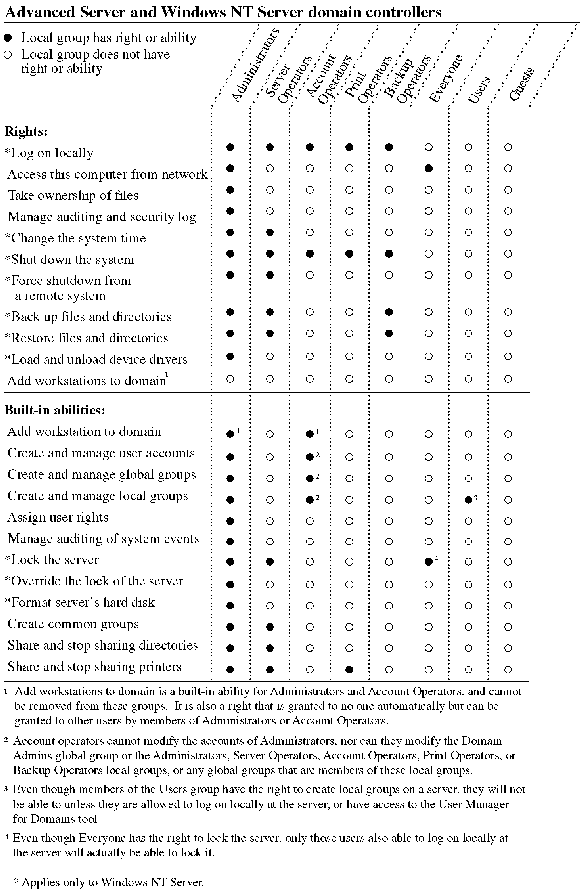
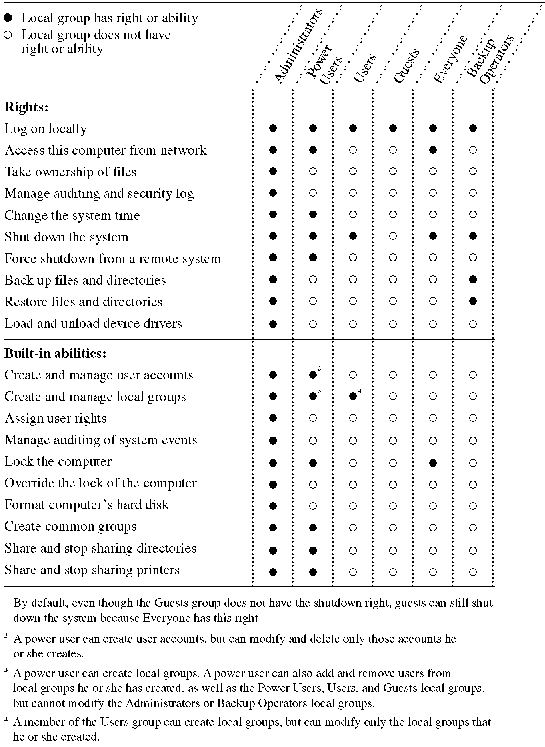
The following tables show which rights and built-in capabilities are held by each built-in local group on Advanced Server domains and on Windows NT Workstation and member servers computers.
see graphic
Windows NT Workstations and member servers
see graphic
The following table presents the built-in rights with comments about the specific actions the rights allow, as well as which local groups have the rights by default on both domain controllers and on workstations and member servers.
|
|
Granted to
|
|
|
User rights
|
Comments
|
Domain controllers
|
Workstations and member servers |
|
Manage auditing and security log
|
Specify what types of file and object access are to be audited. View and clear the security log.
|
Administrators
|
Administrators |
|
Back up files and directories
|
|
Administrators, Server Operators, Backup Operators
|
Administrators, Backup Operators |
|
Restore files and directories
|
This right supersedes file permissions; a user with the Restore right can overwrite files for which he or she has no permissions, when performing a restore.
|
Administrators, Server Operators, Backup Operators
|
Administrators, Backup Operators |
|
Change the system time
|
|
Administrators, Server Operators
|
Administrators, Power Users |
|
Access this computer from network
|
Access the computer from another computer on the network.
|
Administrators, Everyone
|
Administrators, Power Users, Everyone |
|
Log on locally
|
Ability to log on at the computer itself on the computer’s keyboard.
|
Administrators, Server Operators, Account Operators, Print Operators, Backup Operators
|
Administrators, Backup Operators, Power Users, Users, Guests |
|
Shut down the system
|
|
Administrators, Server Operators, Account Operators, Print Operators, Backup Operators
|
Administrators, Backup Operators, Power Users, Users |
|
Add workstations to the domain
|
Allows a user who is not a member of the domain’s Administrators group to add computers running Windows NT Workstation or computers running Advanced Server or Windows NT Server as member servers to the domain.
|
None1
|
N/A |
|
Take ownership of files or other objects
|
Take ownership of files and directories on the computer.
|
Administrators
|
Administrators |
|
Load and unload device drivers
|
|
Administrators
|
Administrators |
|
Force shutdown from a remote system
|
This right gives a user no capabilities in this version of Windows NT but will be supported in future upgrades of the operating system.
|
Administrators, Server Operators
|
Administrators, Power Users |
|
|
|
1 Members of the domain’s Administrators and Account Operators groups can always add workstations to a domain, whether or not they have this right assigned to them. This right is needed only to enable users who are not members of these groups to add workstations to the domain.
|
The following sections describe the purpose and capabilities of each built-in local group:
Administrators
The Administrators local group in a domain, on a computer running Windows NT Workstation, or on a member server has full control over its computer. The Administrators local group is the only group that automatically is granted every built-in right and ability. Administrators manage the overall configuration of the domain and the domain’s controllers.
By default, the Domain Admins global group is also a member of the Administrators local group, but it can be removed.
In Advanced Server, the "Access this computer from network" user right cannot be revoked from the Administrators local group.
Users
Users logged on as members of the Users local group cannot log on locally at servers running Windows NT Server. However, they do possess certain rights at their local workstations and can perform most necessary tasks.
By default the Domain Users global group is a member of the Users local group, but it can be removed. .
Guests
The Guests local group allows occasional or one-time users to log on to a workstation’s built-in Guest account interactively (local guest logon) or to a domain’s built-in Guest account remotely (network guest logon), and be granted limited capabilities. Users logged on as members of the Guests local group have no rights at domain servers. However, they do have certain rights at their individual workstations. By default, the Domain Guests global group is a member of the Guests local group, but it can be removed.
For information about the Guest account, see Built-in Guest User Account.
Account Operators
Members of the Account Operators local group can use User Manager for Domains to create user accounts and groups for the domain and to modify or delete most user accounts and groups of the domain. Account Operators can also log on to domain servers, can shut down Windows NT domain servers, and can use Server Manager to add computers to a domain.
However, an account operator cannot modify or delete the Domain Admins global group, nor the Administrators, Account Operators, Backup Operators, Print Operators, or Server Operators local groups or any global groups belonging to these local groups. Account operators cannot modify the accounts of members of any of these groups and cannot administer security policies.
Backup Operators
Members of the Backup Operators local group can back up and restore files on Advanced Server and Windows NT primary and backup domain controllers.
Print Operators
Members of the Print Operators local group can create, delete, and manage printer shares on the domain’s primary and backup domain controllers. They can also log on at these servers, and shut them down.
Server Operators
Members of the Server Operators local group can manage the domain’s primary and backup domain controllers. For example, they can create, delete, and manage printer shares at these servers; create, delete and manage network shares, and change the system time.
Members of the Server Operators local group cannot manage domain security.
Replicator
The Replicator local group supports directory replication functions. The only member of the domain’s Replicator local group should be a domain user account used to log on the Directory Replicator services of the primary domain controller and the backup domain controllers in the domain. Do not add the user accounts of actual users to this group.
For information about directory replication, see Chapter 5, "Managing Shared Resources and Resource Security."
Special Groups
In addition to the built-in groups mentioned, other groups are created by the system and are used for special purposes. Because the memberships of these groups cannot be altered, the groups are not listed in User Manager for Domains.
However, when you administer a computer and Advanced Server presents lists of groups, these special groups sometimes appear in the list. For example, they can appear when assigning permissions to directories, files, shared network directories, or printers.
|
Group
|
Refers to |
|
Everyone
|
Anyone using the computer. This includes all local and remote users (that is, the Interactive and Network groups combined).
In a domain, members of Everyone can by default access the network, connect to a server’s shared network directories, and print to a server’s printers. |
|
Interactive
|
Anyone using the computer locally. |
|
Network
|
All users connected over the network to the computer. |
|
System
|
The operating system. |
|
Creator Owner
|
Transfer of permissions to creators of subdirectories, files, and print jobs. For a directory, if permissions are granted to the Creator Owner group, the creator of a subdirectory or file will be granted those permissions for that subdirectory or file. For a printer, if permissions are granted to the Creator Owner group, the creator of a print job will be granted those permissions for that print job. |
Using Administrators and Operators — An Example
Suppose a medium-sized group is deciding how to assign its technical staff to the various administrator and operator groups. (It is recommended that at least one member of either the Administrators or Server Operators group is present during all hours that people are using the network.)
 At least one person must have an administrator account. Members of the Administrators group are ultimately responsible for planning and maintaining network security for the department. If desired, members of the domain’s Administrators group can administer users’ Windows NT Workstation computers.
People responsible for hiring new or temporary employees, or for helping newly hired people get started would be good candidates for the Account Operators group. They can create domain accounts for the new employees and put these accounts in the appropriate groups.
If the domain’s Administrators group has few members, assign at least one additional person to the Server Operators group. This group keeps the domain servers running. Accordingly, members of this group can shut down servers, set the system time on servers, lock and override the lock of servers, share directories and printers on the server, and format its hard disks.
If printing documents quickly is important, add several capable people to the Print Operators group to ensure that printer problems can always be addressed quickly.