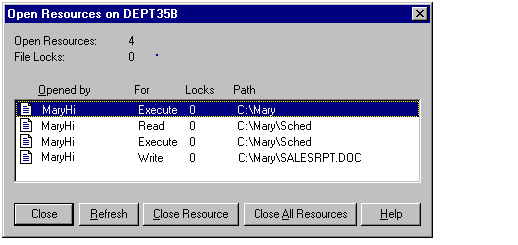

You can view the list of resources that are open on a computer, close a single resource, or close all resources. When you close a resource, you disconnect the users who are connected.
Use the Open Resources dialog box to view and close resources (view the properties for the computer, and click on In Use).
|
Item |
Description |
|
Open Resources |
The total number of open resources on the computer. |
|
File Locks |
The total number of file locks on open resources. |
|
Icon |
A graphic representation of each listed resource: |
|
A file |
|
|
A named pipe |
|
|
A print job in a print spooler |
|
|
A resource of an unrecognized type |
|
|
Opened By |
The user name (or sometimes the computer name) of the user who opened the resource. |
|
For |
The permission granted when the resource was opened. |
|
Locks |
The number of locks on the resource. |
|
Path |
The path of the open resource. |
In some cases, a print job is monitored as an open named pipe.
Note
While you are administering another computer remotely, your connection is displayed in the Open Resources dialog box as an open named pipe. It cannot be closed.
For more information about viewing resources, see "Viewing Resources In Use" in Server Manager Help.


