No Access
Using Advanced Server security features you can control access to printers, track printer use and ownership, and take ownership of printers.
To control printer usage under Advanced Server, set permissions for each shared printer queue. By default, all of the shared printers queues that you create are available to all network users. To restrict access to a shared printer queue you must alter its permission settings for a particular group or user. To change permissions on a shared printer queue, you must be the owner of the printer or have been granted Full Control permission. To change settings, click on the Security tab in the printer’s Properties sheet and then click on Permissions.
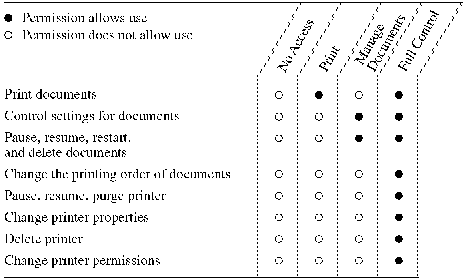
Four types of permissions apply to network printers:
No Access
Print
Manage Documents (permission to manage all documents aimed at that printer)
Full Control
Although permissions are cumulative, the No Access permission overrides all other permissions.
To allow the following uses of a printer, grant the permission shown in the following table.
By default, Administrators, Print Operators, and Server Operators have Full Control rights on a server. All users can manage their own documents.
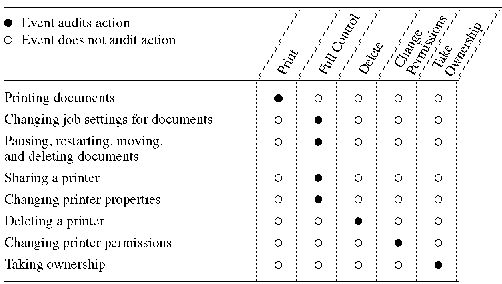
By auditing a printer, you track its usage. For a particular printer, you can specify which groups, users, and actions to audit. You can audit both successful and failed actions. Advanced Server stores the information generated from auditing in a file. You can view the information using Event Viewer. For more information, see Chapter 7, "Monitoring Events."
To audit a printer, you must set the audit policy to audit file and object access. Set the audit policy using User Manager for Domains. For more information on audit policy, see Chapter 2, "Managing Advanced Server Domains."
To audit the following activities for a printer, select the events shown in the following table.
Use the Ownership button to determine who owns the shared printer queue and, optionally, to take ownership of the printer. You can take ownership of a printer if you have Full Control of the shared printer queue or if you are logged on as a member of the Administrators group. Ownership allows you to set permissions for the printer.