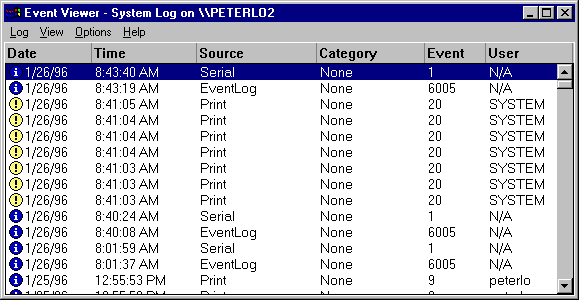
An event is any significant occurrence in the system (or in an application) that requires user notification. Some critical events are noted in on-screen messages. An event that does not require immediate attention is noted in an event log. Event logging starts automatically every time you start Advanced Server. With an event log and a tool called Event Viewer, you can troubleshoot various hardware and software problems, and monitor Advanced Server security events. You also can archive logs in various file formats.
This chapter contains the following sections:
Advanced Server records events in the following types of logs:
 The system log contains events logged by Advanced Server system components. For example, the failure of a service to start during startup is recorded in the system log. The types of events that are logged by system components are determined by Advanced Server.
The security log can contain valid and invalid logon attempts as well as events related to resource use, such as creating, opening, or deleting files or other objects. For example, if you use User Manager for Domains to enable logon and logoff auditing, attempts to log on to the system are recorded in the security log.
The application log contains events logged by applications. For example, a database program might record a file error in the application log. Application developers decide which events to monitor.
System and application logs can be viewed by all users; security logs are accessible only to system administrators.
This section discusses the following topics:
Event logs consist of a header, a description of the event (based on the event type), and, optionally additional data. Most security log entries consist of the header and a description.
Event Viewer displays events from each log separately. Each line shows information about one event, including date, time, source, category, Event ID, user account, and computer name.
Note

When viewing an error log on a LAN Manager 2.x server, only the date, time, source, and event ID are shown. When viewing an audit log on a LAN Manager 2.x server, only the date, time, category, user, and computer are shown.