For each restore job, you must specify a source and a destination. The source will always be storage media and the destination will be a drive or directory.
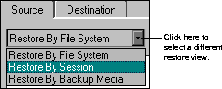
ARCserveIT's restore feature provides you with the most convenient and thorough method for finding the files you want to restore. There are three methods by which you can choose to restore your files:
It all depends on what you know about the files you want to restore and the media you will need to use.
The three available restore methods display the source information by either using the ARCserveIT database or by reading what devices are currently attached to the ARCserveIT host. "Restore by File System" and "Restore by Session" use the database, "Restore by Backup Media" does not.
When using either "Restore by File System" or "Restore by Session", the information for the source tree is taken from the ARCserveIT database and includes information based on all the backups made since you started using ARCserveIT. Unless you have purged or pruned your Job records or media records from the ARCserveIT database, you should be able to restore all files from backups you have performed with ARCserveIT.
"Restore by File System" is the default view in the source tab of the Restore Manager window. Selecting a client will display the drives or volumes, directories, and files that were backed up. If you have backed up something more than once, your local host for example, the drive will be displayed only once in the graphical tree, but you will still be able to restore any version of your data that is in the database.
Use "Restore by File System" when you have a general idea of what you need to restore. This representation will provide you with the best overall picture of your network and the files you wish to restore.
The "Restore by Session" method displays a list of all media that have been used for backup jobs, and the files that are contained on them. ARCserveIT reads the file information directly from its database, which cuts down on the amount of time it would take to read all this information from each of your media.
Use the "Restore by Session" method if you already know what media the data you need to restore is on.
The "Restore by Backup Media" method displays all the device groups and media that are currently attached to the host. You select the device group and media, and then you can specify the session(s) on the media to restore.
The "Restore by Backup Media" method does not use the ARCserveIT database. Therefore, you cannot pick individual files and directories you want to restore from a directory tree. Unless you specify filters to include or exclude files and directories, every file in a session is restored.
Use the "Restore by Backup Media" method in the event that the ARCserveIT databases are not available or the media's history has not been merged into the ARCserveIT database.
Follow the steps below to change your restore view: