How User Logons Work
Network resources are protected at several levels by different processes. However, access to a domain or a computer is protected by logon security. This security requires users to identify themselves to the domain or the computer. The user name and the password that the user types in the Logon Information dialog box are checked against the computer directory database if the user is logging on to a user account defined on the computer, or against the domain directory database if the user is logging on to a domain user account.
Through directory services, authenticated accounts are available for use with all Advanced Server network services.
Interactive and Remote Logons
Two logon processes can start logon authentication:
 Interactive logon occurs when the user types information in the Logon Information dialog box displayed by the computer’s operating system. In the Domain box, the user selects either the name of a domain or the name of the computer being used for logon, depending on where the user account being logged on to is defined.
Remote logon takes place when a user already is logged on to a user account and makes a network connection to another computer. For example, the user connects to another computer using the Map Network Drive dialog box or the net use command.
For information about connecting to computers in a non-trusting domain, see Chapter 3, "Working With User and Group Accounts."
User Authentication
On a computer running Windows NT Workstation or member servers running Windows NT Server, the Net Logon service processes logon requests for the local computer. On a domain controller, the Net Logon service processes logon requests for the entire domain.
The Net Logon service initiates the following processes: discovery, secure communications channel setup, and pass-through authentication.
Discovery: When a computer running Windows NT Workstation or a member server running Windows NT Server starts, the Net Logon service attempts to locate a domain controller running Advanced Server or Windows NT Server in its domain. The Net Logon service on PDCs and BDCs likewise attempts discovery with all trusted domains. Once a domain controller has been discovered, it is used for subsequent user account authentication.
Secure communications channel: A computer’s Net Logon service establishes secure communications channels with the Net Logon services on servers that are located by the discovery process. These secure communications channels are used to exchange user identification data between computers’ Net Logon services.
Pass-through authentication: When a user logs on, the user specifies credentials that identify the user account. When the user account must be authenticated but the logon computer is not a domain controller in the domain where the user account is defined nor the computer on which the user account is defined, the computer passes the logon information to a domain controller (directly or indirectly) on which the user account is defined.
Pass-Through Authentication
Pass-through authentication occurs in the following cases:
At interactive logon when a user logs on to a computer running Windows NT Workstation or a computer running Windows NT Server as a member server and the name in the Domain box in the Logon Information dialog box is not the computer name.
The logon computer sends the logon request to a domain controller in the domain to which the logon computer belongs. The controller checks the domain name. If the domain name is the domain to which the controller belongs, the controller authenticates the logon credentials against its directory database and passes the account identification information back to the logon computer, allowing the user to connect to resources on both the logon computer and the domain.
If the domain name is not the one to which the domain controller belongs, the domain controller determines whether the domain is a trusted domain. If it is a trusted domain, then the domain controller passes the logon request through to a domain controller in the trusted domain. That domain controller authenticates the account user name and password against its domain directory database and passes the account identification information back to the initial domain controller which sends it back to the logon computer.
If the name in the logon credentials is not the computer name, not the name of the domain to which the computer belongs, and not the name of a domain trusted by the computer’s domain, then the credentials are assumed to belong to an untrusted domain and the interactive logon fails.
At interactive logon when the Windows NT computer being logged on to is a domain controller but the name in the Domain box is not the domain to which the controller belongs.
The controller checks the domain name to see if it is a trusted domain. (The domain controller does not check for the computer name because its directory database contains only domain accounts.) If the domain is a trusted domain, then the controller passes the logon information to a domain controller in the trusted domain for authentication. If the trusted domain controller authenticates the account, the logon information is passed back to the initial domain controller and the user is logged on. If the account is not authenticated (that is, not defined in the trusted domain directory database), the logon fails.
If the user is logged on to a computer or domain account and then tries to make a network connection to another computer, pass-through authentication proceeds as in interactive logon. The credentials used at interactive logon are used for pass-through authentication unless the user overrides those credentials by typing a different domain or computer name and user name in the Connect As box in the Map Network Drive dialog box.
If the user tries to make a network connection to a computer in a domain that does not trust the user’s domain, then the logon proceeds as if the user were connecting using an account on the remote computer. The computer being connected to authenticates the logon credentials against its directory database. If the account is not defined in the directory database but the Guest account is enabled on the computer being connected to, and if the Guest account has no password set, the user is logged on with Guest privileges. If the Guest account is not enabled, the logon fails. For information about the Guest account, see Chapter 3, "Working With User and Group Accounts."
If the computer being connected to is a BDC in the domain where the user account is defined, but the BDC fails to authenticate the user’s password (for example, the password has changed but the BDC is not synchronized at the time the user logs on), then the BDC passes the logon request through to the PDC in the same domain.
How Administrators Should Log On
Most network administrators have dual roles. They are both administrators and users of the network. For this reason, it is a good idea for each administrator to have two domain user accounts. One of these accounts should be in the Domain Admins global group and should be used to perform network management tasks. The other account should be in the Domain Users global group and should be used at all other times.
A network is more secure if an administrator uses two accounts. While logged on as a regular user, an administrator cannot inadvertently change aspects of the network that only administrators can change. And, if an administrator were to accidentally introduce a virus, the program would not have the rights of an administrator and would not modify the operating system.
Logging On at a Computer Running Windows NT Workstation or a Computer Running Windows NT Server as a Member Server
The Logon Information dialog box prompts the user for a user name, password, and domain or computer name (Domain).
The User name and Password fields are straightforward; however, the content of the Domain list depends on whether the computer participates in a domain.
If the computer participates in a domain, the list contains both the computer name and the domain name in which the computer’s computer account resides, as well as any domains trusted by that domain. In other words, every domain (including the computer itself) in which user accounts can be authenticated.
If the computer is a member of a workgroup, then the user must log on to the local computer.
If a user with a domain account is logging on to an individual computer account, the user selects the computer name — rather than a domain name — in the Domain list. Then the computer checks its directory database for the specified user name and password. If a match occurs, the logon is approved and the user’s logon information is obtained from the account on the computer.
To log on to a domain, the user selects the name of the domain in which the user account resides. This domain either is the domain in which the computer’s computer account resides or in a domain that is trusted by that domain. When the user clicks OK, the computer sends the domain name, user name, and password to a domain controller. The domain controller checks the domain name and then checks the user name and password against that domain’s directory database. It processes the request as follows:
If the domain name is correct and the user name and password match a domain account, the server notifies the computer that the logon is approved.
If the domain name is different and the domain controller recognizes the domain as a trusted domain, the domain controller passes the information to the appropriate domain which authenticates the logon and sends the information back to the original domain controller.
If the domain name is different and the domain controller does not recognize the domain, the controller denies domain access.
Cached Logon Information
The first time a user logs on to a domain account from a given computer, a domain controller downloads validated logon information (from the directory database) to the computer. This downloaded information is cached on the computer. On subsequent logons, if a domain controller is not available, the user can log on to the domain account using the cached logon information.
Computers running Windows NT Server and Windows NT Workstation store the information used to authenticate the last several (the default is 10) users who logged on interactively. The credentials for users who log on to the local computer also are stored in that computer’s local directory database.
Logging On at a Windows NT Server Domain Controller
Logging on at a computer running Windows NT Server as a domain controller is identical to logging on at a computer running Windows NT Workstation except that servers configured as domain controllers do not maintain a local accounts database separate from the accounts in the directory database. The user must log on to a domain account.
Not everyone with an account in a domain can log on locally at the domain’s controller servers. By default, only members of the Administrators, Server Operators, Print Operators, Account Operators, and Backup Operators groups can do so.
For more information about groups and their rights and abilities, see Chapter 3, "Working With User and Group Accounts."
Logging On at Windows 95, Windows for Workgroups, MS-DOS, or LAN Manager, Version 2.x, Client Computers
Logons from client computers other than computers running Windows NT Workstation and computers running Windows NT Server as member servers are validated by a domain controller when the user logs on to the network. The extent of the validation is checking that the domain, user name, and password are typed correctly. The client computers do not receive any account information at the workstation that can be cached and used for access to local resources. If domain controllers are unavailable when a user logs on from one of these client computers, the user cannot use network resources that are protected by domain permissions.
Deciding on a Domain Model
A domain model is a grouping of one or more domains with administration and communications links between them (trust relationships) that are arranged for the purpose of user and resource management.
By properly planning and organizing domains, you can simplify network administration and ensure that users can connect to available resources throughout the network. For example, you can set up your domains so that all user accounts and global groups are valid in all domains.
To decide how many domains your organization needs, take into account the work structure and number of users. Advanced Server domain models provide the flexibility needed for different organizations. These include both small and large organizations, as well as organizations with many small branch offices.
In addition, expansion is easy. Offices can start out with separate domains and can link to each other later or can be added to existing domains.
Your first consideration is the size of your organization because the size of the directory database determines how many domains you need.
Directory Database Size
If you are managing a small or medium organization, you probably do not need to worry about the upper limits of an Advanced Server domain. However, if you are planning for significant growth, you should keep these numbers in mind.
The limiting factor for the size of a domain is the number of user accounts that can be supported by a single directory database.
A domain consists of user accounts, computer accounts, and group accounts, both built-in and those you create. Each of these objects occupies space in the directory database file. The practical limit for the size of the directory database file depends on the type of computer processor and amount of memory available in the machine being used as the primary domain controller.
Different types of objects require different amounts of space in the directory database file, as follows:
|
Object
|
Space Used |
|
User account
|
1.0K |
|
Computer account
|
0.5K |
|
Global group account
|
4.0K (average group size = 300 members) |
|
Local group account
|
0.5K (no members) |
|
Local group member
|
0.13K |
When computing the expected size of the directory database, remember that each user’s Windows NT Workstation has a computer account. You also should allow for approximately 0.5 MBytes of control space overhead.
Single Domain Model
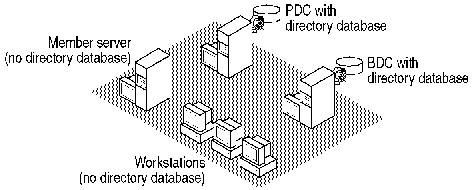
In most cases, you can use the single domain model. In this model, the network has only one domain. You create all of the users and global groups in this domain. The single domain has a PDC with one or more BDCs.
see graphic
Single domain model
The single-domain model is an appropriate choice for organizations that require both centralized management of user accounts and ease of administration. Any member of the Domain Administrators group can administer all network servers and domain accounts on the PDC.
A network can use the single domain model if the number of users and groups does not jeopardize performance. The exact number of users and groups depends on the number of servers in the domain and the server hardware.
Having a single domain also means that all of your network administrators can administer all of the network servers. Dividing a network into domains enables you to create administrators who can administer only some servers, such as those in their own departments.
Single Master Domain Model
When a network does need to be divided into domains for organizational purposes and the network has a small enough number of users and groups, the master domain model may be the best choice. This model offers both centralized administration and the organizational benefits of multiple domains.
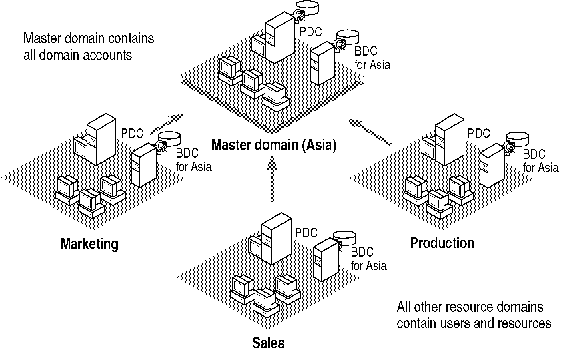
With this model, one domain — the master domain — acts as the central administrative unit for user and group accounts. All of the other domains in the network trust this domain. This means that they recognize the users and global groups that are defined in it. If your company has a specialized department that manages your LAN, it is logical to have the this department administer the master domain.
Users log on to their accounts in the master domain. Resources, such as printers and file servers, are located in the other domains. Each resource domain establishes a one-way trust with the master domain, enabling users with accounts in the master domain to use resources in all of the other domains. The network administrator can manage the entire multiple-domain network and its users and resources by managing a single domain.
see graphic
Single master domain model
The single most important benefit of the single master domain model is its flexibility of administration. For example, in a network requiring four domains, it may at first seem easier to create four separate user account databases, one for each domain. However, by putting all user accounts in a single directory database on one of the domains and then implementing one-way-trust relationships between these domains, you can consolidate administration of user and computer accounts.
The administrator of a master domain can administer all resources or delegate this responsibility to local administrators. Users need only one logon name and one password to use resources in any of the domains.
The single master domain model balances the requirements for account security with the need for readily available resources on the network because users are given permission to use resources based on their master domain logon identity.
The single master domain model is particularly suited for the following:
Decentralized resource management or local system administration capability. Departmental domains can have their own administrators who manage the resources in the department.
Resources can be grouped logically, corresponding to local domains.
Multiple Master Domain Model
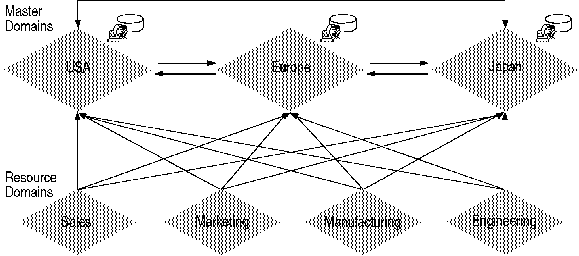
A multiple master domain model consists of two or more master domains. Like the single master domain model, the master domains serve as account domains, with every user account created and maintained on one of these master domains. A company’s LAN management department can manage these master domains centrally. Like the single master domain model, the other domains on the network are called resource domains. Resource domains do not store or manage user accounts. Rather, they provide resources such as shared file servers and printers to the network.
In this model, every master domain is connected to every other master domain by a two-way trust relationship. Each resource domain trusts every master domain with a one-way trust relationship. The resource domains can trust other resource domains, but are not required to do so. Because every user account exists in one of the master domains and because each resource domain trusts every master domain, every user account can be used on any of the resource domains.
see graphic
Multiple master domain model
A user logs on to the domain that contains his of her account. Every master domain contains one PDC and at least one BDC.
The multiple master domain model incorporates all of the features of a single master domain model and also accommodates the following features:
Organizational needs. Domains can be configured to mirror specific departments or internal company organizations.
Dedicated Server in a Master Domain Model
An Advanced Server computer dedicated to a specific task, such as printing or running database applications, is an appropriate choice for organizations wishing to offload some of their high-volume operations. Such a server is configured as a primary domain controller in a domain that contains no other servers or workstations. Trust relationships with other domains then are established so that users from the trusted domains can access its resources.
Because a "dedicated" server is the only computer in its domain, it does not need to replicate the user accounts database nor respond to interactive logon requests. Its sole function is to perform specific tasks. An example follows.
A Marketing department needs a print server. It already has a Marketing domain which contains a primary domain controller, backup domain controllers, and user accounts. Instead of adding another backup domain controller in the Marketing domain for use as a print server, it creates a primary domain controller in a new domain called Marketing Print.
The administrator then creates a one-way trust relationship from the Marketing Print domain to the Marketing domain. This enables users in the Marketing domain to use the dedicated print server.
To allow for simple administration of the dedicated print server by the administrator of the Marketing domain, the administrator adds the Marketing\Domain Admins global group to the Administrators local group in the Marketing Print domain.
Managing Domains
When you have established at least one domain, you can use the utilities provided in Windows NT Server Tools, Windows NT Administrative Tools, or Windows NT Server to perform the domain management tasks described in this section.