To work with shared directory permissions, you must be logged on as a member of the Administrators or Server Operators group.
Permissions set on shared directories are called share permissions and they determine who can use shared directories over the network and in what manner.
When a directory is shared, file and directory permissions apply to users accessing the shared directory over the network, in addition to share permissions. Therefore, share permissions are not critical to the security of Advanced Server directories.
When you share a directory, you can grant each group and user one of four types of permissions for the share and all of its subdirectories and files: Full Control, Change, Read, or No Access.
To secure shared directories effectively, keep the following points in mind:
To work with shared directory permissions, you must be logged on as a member of the Administrators or Server Operators group.
The default permission on a newly-created share is Full Control for Everyone.
Permissions set through a shared directory are effective only when the directory is accessed over the network.
Permissions set through a shared directory apply to all files and subdirectories in the shared directory.
Permissions set through a shared directory operate in addition to permissions set on the directory itself.
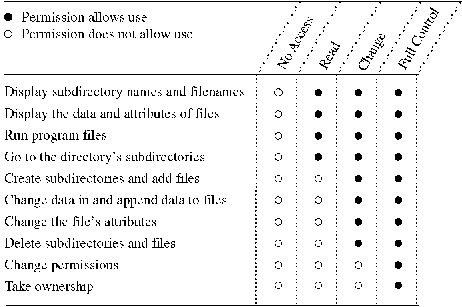
The following table shows the permissions for files and directories granted through a shared directory and the actions available to users for each permission.
Use the Access Through Share Permissions dialog box to change permissions for the listed groups and users and to modify the permissions list.
For information about managing share permissions, see "To set, view, change, or remove permissions through a shared directory" in Windows NT Help.
You also can set permissions on shared directories using the net perms command. For more information, type net help perms at the Advanced Server command prompt.