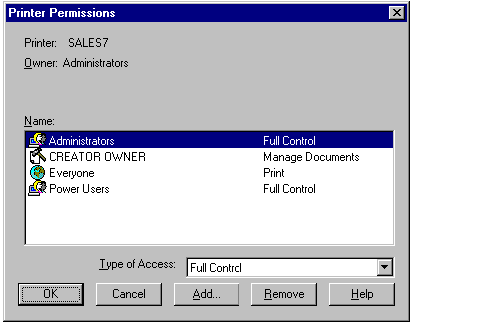
Printer permissions specify the type of access a user or group has to use the printer. The printer permissions are No Access, Print, Manage Documents, and Full Control.
Note
If you are the owner of the printer or have Full Control permission, you can set and change printer permissions.
For information about setting print permissions, see Chapter 6, "Setting Up Print Servers," and "To limit access to a shared printer" in Windows NT Help.
You also can set permissions on network printers using the net perms command. For more information, type net help perms at the Advanced Server command prompt.
This section discusses the following topics:
One of the helpful tasks that Advanced Server performs is keeping shared resources current. This is accomplished through the Directory Replicator service. If you have a set of files that you want to distribute to many users, you can set up and maintain identical directory trees on multiple servers and workstations, and balance the workload among several computers.
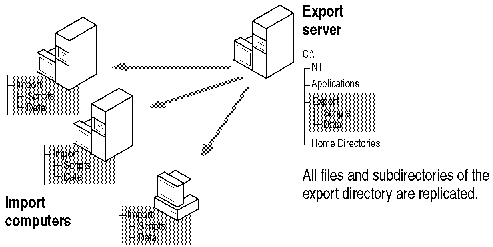
To do so, configure one server as an export server, place the master copies of the files on the export server, and configure other computers to act as import computers.
Only one copy of each file needs to be maintained and every computer that participates has identical copies of those files. Every export server maintains a list of computers to which subdirectories are exported, and each import computer maintains a list of computers from which subdirectories are imported.
When you update a file in the directory tree on one server (the export server), the updated file is copied automatically to all the other computers (the import computers). Only servers running Advanced Server or Windows NT Server can be export servers; import computers can run Advanced Server, Windows NT Server, or Windows NT Workstation.
A file first is replicated when it is added to an exported directory and every time a change is saved to the file on the export server.
Directory replication helps to balance workloads. If you have many users who need to receive the same file periodically, you can replicate the file directory to several computers to prevent any one server from becoming overburdened.
You also can replicate directories between computers in different domains. Export servers can export to domain names and import computers can import from those domain names. This is a convenient way to set up directory replication for many computers; each export server and import computer needs to specify only a few domain names for export or import rather than a long list of computer names.