In User Manager for Domains, create a domain user account for the Directory Replicator service to use to log on. Be sure the user account has the Password Never Expires option selected and all logon hours allowed.
Directory replication is initiated and carried out by the Directory Replicator service. This service operates on each export server and import computer that participates in replication. The service on each computer logs on to the same user account, which you create for this purpose.
You set up an export server and import computers to send and receive updated files. An export path on the export server contains the directories and subdirectories of files to be replicated. Directories in an export path must be specified individually in order to be exported. When changes are saved to files in these directories, the files automatically replace the existing files on all of the import computers.
You also can specify whether the export server sends changes as soon as a file has changed or waits until an export subdirectory has been stable for two minutes. This prevents exporting partially changed subdirectory trees.
In addition, you can lock an export or import directory. Changes to a locked directory are not exported or imported until you unlock the directory.
On the export server, you can designate which computers or domains are to receive replicated copies of the directories the server is exporting.
An export server has the following path as its default:
/var/opt/lanman/shares/asu/repl/export
All directories to be replicated are exported as subdirectories in the export path. Subdirectories created in the export path and files placed in those subdirectories are exported automatically. Export servers can replicate any number of subdirectories (limited only by available memory) with each exported subdirectory having up to 32 subdirectory levels in its tree.
An import computer has the following path as its default:
/var/opt/lanman/shares/asu/repl/import
Imported subdirectories and their files are placed here automatically. You do not need to create these import subdirectories. They are created automatically when directory replication occurs.
A network can have multiple export servers. To ensure the integrity of replicated information, they usually do not export duplicate subdirectories. Each master export subdirectory usually is maintained on and exported by a single export server. It is possible to set up multiple servers that export the same subdirectory but the exported files in those multiple master subdirectories may not be identical.
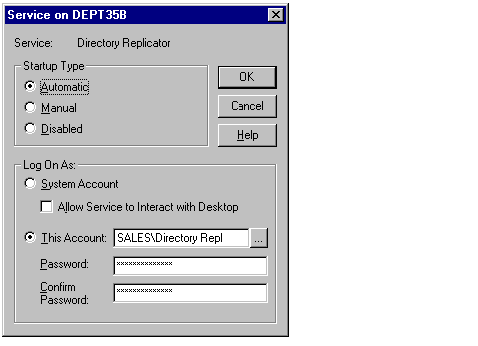
Before a computer can participate in replication, you must create a special user account. Then for each computer in a domain that will participate in replication, configure its Directory Replicator service to log on using that special account.
In User Manager for Domains, create a domain user account for the Directory Replicator service to use to log on. Be sure the user account has the Password Never Expires option selected and all logon hours allowed.
After the user account is created for each computer that will be configured as an export server or an import computer, use Server Manager to configure the Directory Replicator service to start automatically and to log on under that user account. Be sure the password for that user account is typed correctly.
For more information on setting up the Directory Replicator service, see "To configure startup for a service" in Windows NT Help.
For information about managing user accounts, see Chapter 3, "Working With User and Group Accounts."