Assign a logon account to the Directory Replicator service of the export server.
Any computer running Advanced Server or Windows NT Server can be set up as an export server. Before you set up an export server, you must perform the following tasks:
Create the directories to be exported. They must be subdirectories of the replication export path. The default is /var/opt/lanman/shares/asu/repl/export.
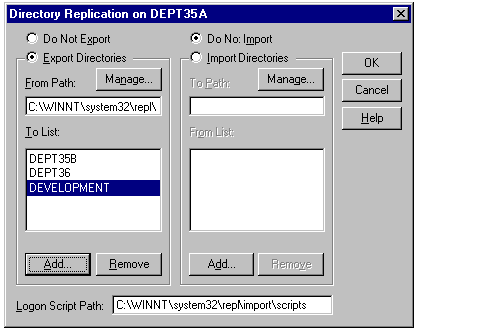
Use the Directory Replication dialog box to set up an export server.
For more information, see "To set up an export server" in Windows NT Help.
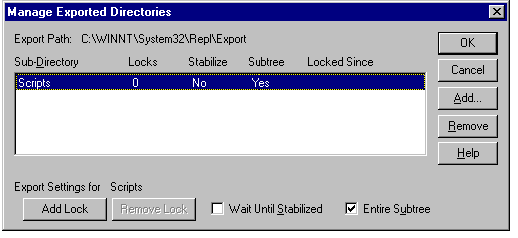
By clicking on Manage under Export Directories in the Directory Replication dialog box, you can manage certain features of subdirectory replication by the export server.
You can lock a subdirectory to prevent it from being exported to any import computers. For example, if you know that a directory will be receiving a series of changes that you do not want partially replicated, you can put one or more locks on the subdirectory in the export path. Until you remove the lock or locks, the subdirectory will not be replicated. The date and time the lock is placed is displayed so that you know how long a lock has been in effect.
When you stabilize a subdirectory, the export server waits two minutes by default after changes before exporting the subdirectory. The waiting period allows time for subsequent changes to take place so that all intended changes are recorded before being replicated.
You can specify whether the entire subtree (the export subdirectory and all of its subdirectories) or just the first-level subdirectory in the export directory path is to be exported.
To manage locks, stabilization, and subtree replication for the subdirectories exported from an export computer, click on Manage under Export Directories in the Directory Replication dialog box.
For information about how to manage export subdirectories, see "To Manage Locks, Stabilization, and Subtree Replication for Export Directories" in Server Manager Help.
Logon scripts are files that can be assigned to user accounts. Every time a user logs on, the assigned logon script is run. Logon scripts allow administrators to affect users’ environments without managing every aspect of it. When a server processes a logon request, the system locates the logon script by combining a file name (specified in User Manager for Domains) with a path name (specified in Server Manager).
If you use logon scripts in a domain that has a primary domain controller and at least one backup domain controller, you should replicate logon scripts among the domain controllers. Master copies of every logon script for a domain should be stored in one replication export directory on one server. This can be the primary domain controller but it does not need to be. Copies of these master logon scripts should be replicated to every server that participates in authenticating logons for the domain. If this is done, only one copy of each logon script will need to be maintained and every server that participates in authenticating domain logons will have identical copies of every user logon script.
By default, Advanced Server computers export directories and logon scripts from the /var/opt/lanman/shares/asu/repl/export/scripts directory, and import directories and logon scripts to the /var/opt/lanman/shares/asu/repl/import/scripts directory. For the primary domain controller and each backup domain controller, the path to imported logon scripts must be entered in the Logon Script Path box of the Directory Replication dialog box.
Note

The logon script path cannot be administered on computers running Windows NT Server as member servers or on computers running Windows NT Workstation. Logon scripts should be stored in /var/opt/lanman/shares/asu/repl/import/scripts or in subdirectories of that path on these computers.
For information about managing logon scripts, see "Setting the Logon Script Path" in Server Manager Help. .