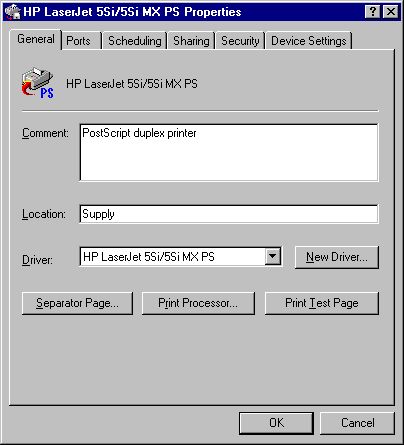
Setting General Properties for a Printer (Shared Printer Queue)
If a particular device is not supported, try setting up the printer according to the following table.
|
If it is a |
Set it up as a |
|
Laser printer: | |
|
HPPCL (LaserJet) compatible |
Hewlett-Packard LaserJet Plus |
|
PostScript compatible | |
|
Color PostScript |
QMS-ColorScript |
|
35-font Plus font set or superset |
Apple LaserWriter® Plus |
|
Dot matrix printer: | |
|
9-pin dot matrix | |
|
IBM compatible |
IBM Proprinter |
|
Epson® compatible |
Epson FX-80 for narrow or FX-100 for wide carriage |
|
24-pin dot matrix | |
|
IBM 24-pin compatible |
IBM Proprinter X24 |
|
Epson LQ compatible |
Epson LQ-1500 |
If your device is not in this list, contact the manufacturer to determine if custom drivers are available.
For information about obtaining new printer drivers for your system, obtain the latest version of the Windows NT HCL or contact your hardware manufacturer. The latest version of the HCL can be downloaded from the Internet. For more information, see the Microsoft World Wide Web site at http://www.microsoft.com/.
Set properties for a printer (shared printer queue) as the last step in the Add Printer Wizard and at any time by displaying the printer’s Properties sheets.
This section describes the following items on the printer’s Properties sheet:
To view to the property sheet of a shared printer queue, open the Printers folder, click on the printer, and then click on Properties in the File menu.